niScope Configure Trigger Width VI
- Updated2025-10-21
- 3 minute(s) read
Configures common properties for width triggering.
A width trigger occurs when a pulse that crosses a vertical threshold you specify and with a polarity you specify also has a duration that is either within or outside a duration range you specify.
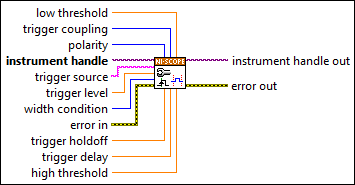
Inputs/Outputs
 low threshold
—
low threshold
—
low threshold specifies, in seconds, the lower bound on the range of pulse durations that triggers the oscilloscope. Refer to the Width Low Threshold property for more information.  trigger coupling
—
trigger coupling
—
trigger coupling specifies how to couple the trigger signal. Refer to the Trigger Coupling property for defined values.  polarity
—
polarity
—
polarity specifies the polarity of the pulses that trigger the oscilloscope for width triggering. Refer to the Width Polarity property for defined values.  instrument handle
—
instrument handle
—
instrument handle identifies a particular instrument session.  trigger source
—
trigger source
—
trigger source passes the source you want the digitizer to monitor for a trigger. Default Value: Channel 0 Refer to the Trigger Source property for defined values.
trigger level
—
trigger level specifies the voltage threshold for the trigger. Default Value: 0.0 V
width condition
—
width condition specifies whether the oscilloscope triggers on pulses of duration within or outside the range of pulse durations bounded by low threshold and high threshold. Refer to the Width Condition property for defined values.  error in
—
error in
—
error in describes error conditions that occur before this node runs. This input provides standard error in functionality.
trigger holdoff
—
trigger holdoff specifies the length of time the digitizer waits after detecting a trigger before enabling NI-SCOPE to detect another trigger. Default Value: 0.0 s
trigger delay
—
trigger delay specifies how long the digitizer waits after it receives the trigger to start acquiring data. Default Value: 0.0 s
high threshold
—
high threshold specifies, in seconds, the upper bound on the range of pulse durations that triggers the oscilloscope. Refer to the Width High Threshold property for more information.  instrument handle out
—
instrument handle out
—
instrument handle out has the same value as the instrument handle.  error out
—
error out
—
error out contains error information. This output provides standard error out functionality. |