niFgen Initialize With Channels for gRPC Session VI
- Updated2025-10-07
- 5 minute(s) read
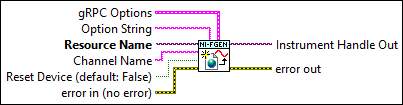
Initializes a new NI-FGEN session on the specified NI gRPC Device Server using the specified instrument(s) and channel(s).
This VI initializes a NI-FGEN session on the specified NI gRPC Device Server and attaches to it from LabVIEW. If the Session Name is specified in the gRPC Options and the same session name previously exists on the server, then NI-FGEN will return an error. If the Session Name in the gRPC Options is empty, the resource name will be used as a session name.
The resulting session in LabVIEW forwards driver calls to the corresponding session on the server.
Inputs/Outputs
 gRPC Options
—
gRPC Options
—
gRPC Options specifies the information used to connect to the server.
 Option String
—
Option String
—
Option String specifies the initial values of certain session properties. Default Values: "Simulate=0,RangeCheck=1,Cache=1, QueryInstrStatus=1" The syntax for Option String is attributeName=value where: attributeName = the name of the attribute value = the value to which the attribute is set. To set multiple properties, separate them with a comma. If you do not wire this input or pass in an empty string, the session uses the default values for these properties. You can override the default values by assigning a value explicitly in a string that you pass for this input. You do not have to specify all of the properties and may leave any of them out. If you do not specify one of the properties, its default value is used.
If simulation is enabled (Simulate=1), you may specify the device that you want to simulate. To specify a device, enter the following syntax in Option String. DriverSetup=Model:< driver model number >;BoardType:< module type >;MemorySize:< size of onboard memory in bytes > Option String Examples:
Note
When you configure multichannel devices, the Option String Channels parameter specifies which channels to initialize. Valid values include channel ranges (for example, "Channels:0-1") and individual channels (for example, "Channels:1").
 Resource Name
—
Resource Name
—
Resource Name specifies the instrument name, for example "PXI1Slot3" where "PXI1Slot3" is an instrument name assigned by Measurement & Automation Explorer (MAX). Syntax:
For NI-DAQmx devices, the syntax is just the device name specified in MAX, as shown in Example 1. Typical default names for NI-DAQmx devices in MAX are Dev1 or PXI1Slot1. You can rename an NI-DAQmx device by right-clicking on the name in MAX and entering a new name. An alternate syntax for NI-DAQmx devices consists of DAQ::NI-DAQmx device name, as shown in Example 2. This naming convention allows for the use of an NI-DAQmx device in an application that was originally designed for a Traditional NI-DAQ device. For example, if the application expects DAQ::1 (Traditional NI-DAQ syntax), you can rename the NI-DAQmx device to 1 in MAX and pass in DAQ::1 for the resource name, as shown in Example 3. If you use the DAQ::n syntax and an NI-DAQmx device name already exists with that same name, the NI-DAQmx device is matched first. You can also pass in the name of an IVI logical name or an IVI virtual name configured with the IVI Configuration utility, as shown in Example 4. A logical name identifies a particular virtual instrument. A virtual name identifies a specific device and specifies the initial settings for the session. Caution NI-DAQmx device names are not case-sensitive. However, all IVI names, such as logical names, are case-sensitive. If you use logical names, driver session names, or virtual names in your program, you must ensure that the name you use matches the name in the IVI Configuration Store file exactly, without any variations in the case of the characters.
Channel Name
—
Channel Name specifies the channel that this VI uses.  Reset Device (default: False)
—
Reset Device (default: False)
—
Reset Device specifies whether you want to reset the device during the initialization procedure. Set Reset Device to TRUE to reset the device. Reset Device performs the same function as the niFgen Reset VI. Resetting a device is not supported when configured for multiple channel-based sessions. Default value: False  error in (no error)
—
error in (no error)
—
error in describes error conditions that occur before this node runs. This input provides standard error in functionality. Default value: no error  Instrument Handle Out
—
Instrument Handle Out
—
Instrument Handle Out passes a reference to your instrument session to the next VI.  error out
—
error out
—
error out contains error information. This output provides standard error out functionality. |
 Port (31763)
—
Port (31763)
—