Measuring Torque Programming Flowchart
- Updated2026-01-29
- 1 minute(s) read
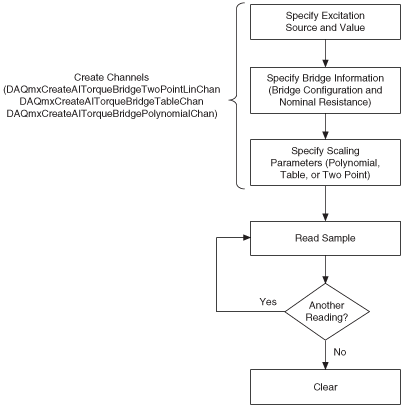
The following flowchart depicts the main steps required in an NI-DAQmx application to measure torque. Alternatively, you can configure a task for measuring torque using the DAQ Assistant.
Tip
To increase performance, especially when multiple samples are read, include the Start function/VI and Stop function/VI in your application. In the previous flowchart, the Start function/VI would come just before you read samples, and Stop would come just before you clear the task.
When selecting the scaling type, choose the one that best matches the specifications for your sensor.
Measuring torque is an example of analog input measurement. Refer to Analog Input Programming Flowcharts for additional flowcharts that can help you create an application.