DAQmx Write (Analog 2D DBL NChan NSamp) VI
- Updated2025-07-28
- 4 minute(s) read
Writes one or more floating-point samples to a task that contains one or more analog output channels.
Inputs/Outputs
 auto start
—
auto start
—
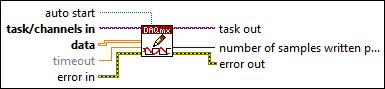
auto start specifies if this VI automatically starts the task if you did not explicitly start it with the DAQmx Start Task VI.  task/channels in
—
task/channels in
—
task/channels in is the name of the task or a list of virtual channels to which the operation applies. If you provide a list of virtual channels, NI-DAQmx creates a task automatically.  data
—
data
—
data contains a 2D array of samples to write to the task. Each row corresponds to a channel in the task. Each column corresponds to a sample to write to each channel. The order of the channels in the array corresponds to the order in which you add the channels to the task. The data you write must be in the units of the generation, including any custom scales. Use the DAQmx Create Virtual Channel VI or the DAQ Assistant to specify these units.  timeout
—
timeout
—
timeout specifies the amount of time in seconds to wait for the VI to write all samples. NI-DAQmx performs a timeout check only if the VI must wait before it writes data. This VI returns an error if the time elapses. The default timeout is 10 seconds. If you set timeout to -1, the VI waits indefinitely. If you set timeout to 0, the VI tries once to write the submitted samples. If the VI could not write all the submitted samples, it returns an error and the number of samples successfully written in the number of samples written per channel output.  error in
—
error in
—
error in describes error conditions that occur before this VI or function runs. The default is no error. If an error occurred before this VI or function runs, the VI or function passes the error in value to error out. If an error occurs while this VI or function runs, the VI or function runs normally and sets its own error status in error out. Use the Simple Error Handler or General Error Handler VIs to display the description of the error code. Use error in and error out to check errors and to specify execution order by wiring error out from one node to error in of the next node.  task out
—
task out
—
task out is a reference to the task after this VI or function runs. If you wired a channel or list of channels to task/channels in, NI-DAQmx creates this task automatically.  number of samples written per channel
—
number of samples written per channel
—
number of samples written per channel is the actual number of samples this VI successfully wrote to each channel in the task.  error out
—
error out
—
error out contains error information. If error in indicates that an error occurred before this VI or function ran, error out contains the same error information. Otherwise, error out describes the error status that this VI or function produces. Right-click the error out indicator on the front panel and select Explain Error from the shortcut menu for more information about the error. |