DAQmx Create Timing Source (Signal From Task) VI
- Updated2025-07-28
- 3 minute(s) read
Creates a timing source that uses the signal you specify to determine when to send ticks to a Timed Loop. You must create a task that can generate the signal and wire that task to the task/channels in input of this VI. Do not use the DAQmx Start Task VI to start the task. The Timed Loop starts the task automatically.
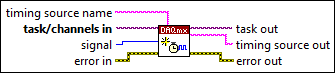
Inputs/Outputs
 timing source name
—
timing source name
—
timing source name is the name to assign to the timing source this VI creates.  task/channels in
—
task/channels in
—
task/channels in is the name of the task or a list of virtual channels to which the operation applies. If you provide a list of virtual channels, NI-DAQmx creates a task automatically.  signal
—
signal
—
signal is the signal to use for the timing source.
 error in
—
error in
—
error in describes error conditions that occur before this VI or function runs. The default is no error. If an error occurred before this VI or function runs, the VI or function passes the error in value to error out. If an error occurs while this VI or function runs, the VI or function runs normally and sets its own error status in error out. Use the Simple Error Handler or General Error Handler VIs to display the description of the error code. Use error in and error out to check errors and to specify execution order by wiring error out from one node to error in of the next node.  task out
—
task out
—
task out is a reference to the task after this VI or function runs. If you wired a channel or list of channels to task/channels in, NI-DAQmx creates this task automatically.  timing source out
—
timing source out
—
timing source out is the name of the timing source this VI creates. Wire this output to the source input of the Input Node of a Timed Loop. If you specified a name for the timing source in the timing source name input, this output contains the same name. If you did not specify a name for the timing source, NI-DAQmx creates a name and sets this output to that name.  error out
—
error out
—
error out contains error information. If error in indicates that an error occurred before this VI or function ran, error out contains the same error information. Otherwise, error out describes the error status that this VI or function produces. Right-click the error out indicator on the front panel and select Explain Error from the shortcut menu for more information about the error. |