WA WP Plot Tree VI
- Updated2024-07-30
- 4 minute(s) read
Plots the whole tree structure of the wavelet packet (WP) tree in a picture control. You can show the node information of path, position, or entropy on each node of the wavelet packet tree.
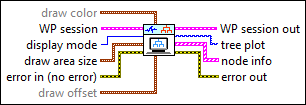
Inputs/Outputs
 draw color
—
draw color
—
draw color specifies the color of the wavelet packet tree.
 WP session
—
WP session
—
WP session specifies a reference to an existing wavelet packet structure.
 display mode
—
display mode
—
display mode specifies the display mode of the node string in the decomposition tree.
draw area size
—
draw area size specifies the size of the area in the picture control in pixels to draw the tree structure display. Wire the Draw Area Size property of tree plot to this control.
 error in (no error)
—
error in (no error)
—
error in describes error conditions that occur before this node runs. This input provides standard error in functionality.
draw offset
—
draw offset specifies the coordinates of the left topmost pixel in tree plot.
 WP session out
—
WP session out
—
WP session out returns a reference to an existing wavelet packet structure, which this VI can modify.
 tree plot
—
tree plot
—
tree plot returns the picture control that displays the tree structure.  node info
—
node info
—
node info returns the position of each node in the wavelet packet tree and the associated location in tree plot.
 error out
—
error out
—
error out contains error information. This output provides standard error out functionality. |
 text color
—
text color
—
 ref
—
ref
—
 t0
—
t0
—
 dt
—
dt
—
 width
—
width
—
 ref
—
ref
—
 t0
—
t0
—
 dt
—
dt
—
 node
—
node
—
 depth
—
depth
—
Examples
Refer to the following VIs for examples of using the WA WP Plot Tree VI:
- Wavelet Packet - Entropy Selection VI: labview\examples\Wavelet Analysis\WAGettingStarted
- Wavelet Packet - Plot Tree VI: labview\examples\Wavelet Analysis\WAGettingStarted
- Wavelet Packet - Join Node VI: labview\examples\Wavelet Analysis\WAGettingStarted
- Wavelet Packet - Split Node VI: labview\examples\Wavelet Analysis\WAGettingStarted