WA Set Coefficients of 2D Discrete Wavelet Transform VI
- Updated2025-12-08
- 4 minute(s) read
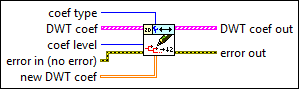
Sets approximation or detail discrete wavelet transform (DWT) coefficients at a specific level. Use the WA Discrete Wavelet Transform VI to compute the DWT. Use the WA Get Coefficients of Discrete Wavelet Transform VI to obtain the DWT coefficients.
Inputs/Outputs
 coef type
—
coef type
—
coef type specifies the coefficient type this VI sets.  DWT coef
—
DWT coef
—
DWT coef specifies the approximation coefficients and the detail coefficients from the multi-level discrete wavelet transform. Each element of the array contains the 2D DWT results of one level. The ith element stores the approximation coefficients and the detail coefficients at level i+1.
 coef level
—
coef level
—
coef level specifies the coefficient level this VI sets. The coef level must be between 1 and the largest level of the coefficients. The levels in the WA Discrete Wavelet Transform VI specifies the largest level of the coefficients. The default is 1, which means this VI sets the coefficients at level 1.  error in (no error)
—
error in (no error)
—
error in describes error conditions that occur before this node runs. This input provides standard error in functionality.  new DWT coef
—
new DWT coef
—
new DWT coef specifies the discrete wavelet transform (DWT) coefficients to set.  DWT coef out
—
DWT coef out
—
DWT coef out returns the discrete wavelet transform (DWT) coefficients set to new DWT coef at the coef type and coef level.
 error out
—
error out
—
error out contains error information. This output provides standard error out functionality. |
 low_low out
—
low_low out
—
Examples
Refer to the following VIs for examples of using the WA Set Coefficients of Discrete Wavelet Transform VI:
- Get and Set Approximation Coefficients VI: labview\examples\Wavelet Analysis\WAGettingStarted
- Get and Set Single Level Detail Coefficients VI: labview\examples\Wavelet Analysis\WAGettingStarted