WA Inverse 1D Discrete Wavelet Transform (Array) VI
- Updated2024-07-30
- 4 minute(s) read
Computes the multi-level inverse discrete wavelet transform (DWT) and returns the reconstructed signal from the approximation coefficients and the detail coefficients. An interpolator with a factor 2 and the lowpass synthesis filters and the highpass synthesis filters implement the inverse DWT at each level. Wire data to the DWT coef input to determine the polymorphic instance to use or manually select the instance.
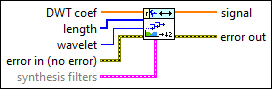
Inputs/Outputs
 DWT coef
—
DWT coef
—
DWT coef specifies the approximation coefficients and the detail coefficients for the multi-level inverse discrete wavelet decomposition (DWT). You must organize the coefficients into a 1D real array starting with the approximation coefficients at the largest level followed by the detail coefficients at all levels in descending order.  length
—
length
—
length specifies the length of the approximation coefficients, the detail coefficients, and the signal. You must organize length into a 1D array starting with the length of the approximation coefficients at the largest level, the length of the detail coefficients at all levels in descending order, and the length of the signal.  wavelet
—
wavelet
—
wavelet specifies the wavelet type of the discrete wavelet analysis. The default is db02. wavelet must be the same type as the wavelet type you selected in the WA Discrete Wavelet Transform VI to compute DWT coef. If you used the analysis filters input of the WA Discrete Wavelet Transform VI to specify wavelet, ignore this input and use the synthesis filters input of this VI to specify the synthesis filters of the wavelet.  error in (no error)
—
error in (no error)
—
error in describes error conditions that occur before this node runs. This input provides standard error in functionality.  synthesis filters
—
synthesis filters
—
synthesis filters specifies the coefficients of the lowpass synthesis filters and the highpass synthesis filters for the wavelet you specify. If you specify a value for synthesis filters, this VI ignores the settings in the wavelet input. You can use the Wavelet Design Express VI to design the analysis filters and the corresponding synthesis filters.
 signal
—
signal
—
signal returns the reconstructed signal.  error out
—
error out
—
error out contains error information. This output provides standard error out functionality. |
Examples
Refer to the following VIs for examples of using the WA Inverse Discrete Wavelet Transform VI:
- ECG Compression VI: labview\examples\Wavelet Analysis\WAApplications
- Image Compression VI: labview\examples\Wavelet Analysis\WAApplications
- Get and Set Single Level Detail Coefficients VI: labview\examples\Wavelet Analysis\WAGettingStarted
- Wavelet Transform and Reconstruction with Image VI: labview\examples\Wavelet Analysis\WAGettingStarted
- Piece Polynomial Function Approx and Comp VI: labview\examples\Wavelet Analysis\WAGettingStarted
- Get and Set Approximation Coefficients VI: labview\examples\Wavelet Analysis\WAGettingStarted