TSA Read from File VI
- Updated2024-07-30
- 3 minute(s) read
Reads a univariate or multivariate (vector) time series from a specified data file. You can use this VI to read spreadsheet text files and WAV files.
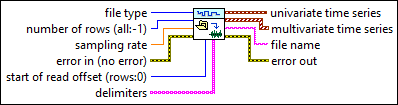
Inputs/Outputs
 file type
—
file type
—
file type specifies the type of the source data file.  number of rows (all:-1)
—
number of rows (all:-1)
—
number of rows specifies the maximum number of rows this VI reads. If number of rows is <0, this VI reads the entire file. The default is -1, which means this VI reads the entire file. If number of rows + start of read offset exceeds the total number of rows in the file, this VI returns a warning. number of rows is valid only if the file type is Spreadsheet Text File.  sampling rate
—
sampling rate
—
sampling rate specifies the sampling rate in hertz. The default is 1000.  error in (no error)
—
error in (no error)
—
error in describes error conditions that occur before this node runs. This input provides standard error in functionality.
start of read offset (rows:0)
—
start of read offset specifies the position in the file, measured in rows, at which this VI begins reading. The default is 0, which means this VI begins reading the file at the first row. If number of rows + start of read offset exceeds the total number of rows in the file, this VI returns a warning. If start of read offset exceeds the total number of rows in the file, this VI returns empty values and a warning. start of read offset is valid only if the file type is Spreadsheet Text File.  delimiters
—
delimiters
—
delimiters specifies an array of strings used to separate fields in a spreadsheet file. The default is a single space character and a single tab character. delimiters is valid only if the file type is Spreadsheet Text File.  univariate time series
—
univariate time series
—
univariate time series returns the univariate time series.  multivariate time series
—
multivariate time series
—
multivariate time series returns the multivariate (vector) time series.  file name
—
file name
—
file name returns the name of the source data file.  error out
—
error out
—
error out contains error information. This output provides standard error out functionality. |