Creating One Transition to Multiple Substates (Statechart Module)
- Updated2023-02-21
- 2 minute(s) read
You can specify that a single transition goes to multiple substates simultaneously. These destination substates must be in different orthogonal regions, such as the following figure shows.

In the previous figure, the statechart enters State 1, which then enters the substates State 2 and State 4 concurrently. The statechart enters these substates because the Initial pseudostates specify that these are the substates to execute first.
Consider what happens if the statechart takes the transition to State 6 and then returns to State 1. In this situation, the statechart enters States 2 and 4 again. However, you might want the statechart to enter States 3 and 5 instead. You can specify this behavior by creating a single transition that enters multiple substates.
Complete the following steps to create a single transition to multiple substates.
- Place a Fork
connector above the regions in State 1.
 Add
Add
- Create a transition from the incoming port to the Fork connector.
- Create a transition from the Fork connector to State 3.
- Create a transition from the Fork connector to State 5.
The statechart diagram now resembles the following figure.
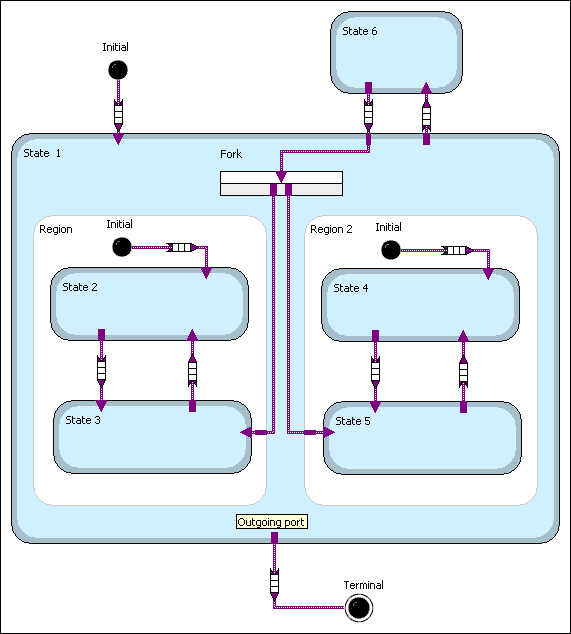
In the previous figure, the behavior of the initial transition remains the same: the statechart enters states 2 and 4. However, if the statechart enters State 6 and then returns to State 1, the Fork connector specifies that the statechart enters States 3 and 5 instead of States 2 and 4.