SIT Set Model Parameters VI
- Updated2023-02-21
- 3 minute(s) read
SIT Set Model Parameters VI
Owning Palette: Model Interface VIs
Requires: Simulation Interface Toolkit
Sets a new parameter value in the model. The elements of non-scalars such as arrays can be set individually. The parameter you want to set is specified by its param index and subindex. The parameter structure is double buffered. Changes can be made to the parameters while the model is running. The model will not see the changes until they are applied. To apply changes to multiple parameters at the same time, set apply changes (T) to FALSE except for the last parameter of the group. This is useful if you want to change multiple values such as the elements of an array or multiple related parameters and want the changes to take affect in the same model time step.
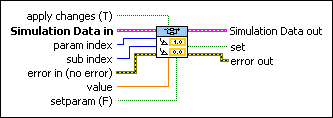
 |
apply changes (T) specifies if you want to apply the new parameter value as well as any previously unapplied changes. This is the default. Set apply changes (T) to FALSE if you do not want to apply the changes immediately. When you set apply changes (T) to FALSE, the VI applies the changes the next time you call the VI with apply changes set to TRUE. |
 |
Simulation Data In specifies unique information about the model DLL. |
 |
param index specifies the index number of a scalar or nonscalar parameter. If the parameter is nonscalar, sub index specifies the index number of an element in that nonscalar parameter. |
|
sub index specifies the index number of an element in a nonscalar parameter. |
 |
error in describes error conditions that occur before this node runs. This input provides standard error in functionality. |
 |
value specifies the new parameter value. |
|
setparam (F) specifies whether you want to set the parameter value. Set setparam (F) to TRUE if you want to set the parameter value. Set setparam (F) to FALSE if you do not want to set the parameter value. |
 |
Simulation Data out returns unique information about the model DLL. |
 |
set returns TRUE if you set a new parameter value. set returns FALSE if you did not set a new parameter value. |
 |
error out contains error information. This output provides standard error out functionality. |