SIT Configure Timing VI
- Updated2023-02-21
- 3 minute(s) read
SIT Configure Timing VI
Owning Palette: Model Interface VIs
Requires: Simulation Interface Toolkit
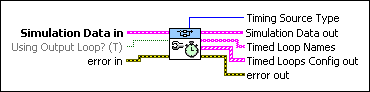
Configures timing information for the simulation. If the simulation does not use a hardware timing source, this VI determines whether the simulation uses 1 kHz timing or 1 MHz timing.
 |
Simulation Data In specifies unique information about the model DLL. | ||||||||||||
 |
Using Output Loop? is TRUE when the driver VI uses a separate output loop for multirate models. | ||||||||||||
 |
error in describes error conditions that occur before this node runs. This input provides standard error in functionality. | ||||||||||||
 |
Timing Source Type returns the type of software timing source that the simulation uses. If HW Timing Src is TRUE, this VI ignores the value of Timing Source Type.
|
||||||||||||
 |
Simulation Data out returns unique information about the model DLL. | ||||||||||||
 |
Timed Loop Names returns the names of any Timed Loops that this VI uses to configure the simulation. | ||||||||||||
 |
Timed Loops Config out returns timing information about any Timed Loops this VI uses to configure the simulation. If you are running a single-rate simulation, tloops out is an array consisting of one element.
| ||||||||||||
 |
error out contains error information. This output provides standard error out functionality. |


