Simple Vector Field Histogram VI
- Updated2023-02-21
- 4 minute(s) read
Simple Vector Field Histogram VI
Owning Palette: Obstacle Avoidance VIs
Requires: Robotics Module
Identifies obstacles and gaps, or open areas, in the robot environment, which you can use to implement reactionary motion in a robot vehicle.
Use the Advanced VFH VI rather than this VI for goal-directed obstacle avoidance.
 | Note You can use any unit of measurement to specify distance and angle values. However, always use consistent units when you specify these values. |
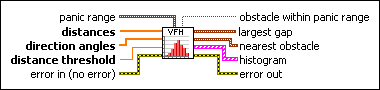
 |
panic range defines the range at which this VI identifies an obstacle as an area of the environment to avoid.
| ||||
 |
distances specifies the distances between the robot sensor and objects in the robot environment. | ||||
|
direction angles specifies the angles at which objects are located with respect to the center of the sensor. Positive values represent locations to the right of the center of the sensor, and negative values represent positions to the left of the center of the sensor. Elements in direction angles correspond to elements in distances. | ||||
 |
distance threshold specifies the distance at which this VI does not consider objects to be obstacles. This VI ignores any objects at distances greater than distance threshold. | ||||
 |
error in describes error conditions that occur before this node runs. This input provides standard error in functionality. | ||||
 |
obstacle within panic range is TRUE if an object within panic threshold angle is nearer to the sensor than the panic threshold distance. | ||||
 |
largest gap describes the largest open area in the robot environment.
| ||||
|
nearest obstacle describes the object nearest to the sensor.
| ||||
 |
histogram returns the histogram data that represents the distances to objects in range of the sensor, arranged by angle and direction. | ||||
 |
error out contains error information. This output provides standard error out functionality. |

Example
Refer to the LIDAR Guided Robot.lvproj in the labview\examples\robotics\LIDAR Guided Robot directory for an example of using the Simple Vector Field Histogram VI.