Get Node Reference VI
- Updated2023-02-21
- 2 minute(s) read
Get Node Reference VI
Owning Palette: Directed Graph Map VIs
Requires: Robotics Module
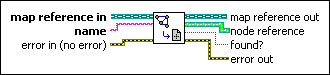
Returns a reference to the map node you specify.
You can wire the node reference this VI returns to the Path Planning VIs to specify the current or goal position of a robot navigating through a map.
 |
map reference in is a reference to the map that represents the robot environment. Use the Create Directed Graph Map VI to generate this LabVIEW class object. |
 |
name specifies the name of the map node. |
 |
error in describes error conditions that occur before this node runs. This input provides standard error in functionality. |
 |
map reference out is a reference to the map that represents the robot environment. You can wire this output to other Path Planning VIs. |
|
node reference contains a reference to the map node with the name you specify. You can wire this output to the Path Planning VIs. |
 |
found? indicates whether the map defines the position of the node you specify. If the map does not define the node, LabVIEW does not return an error. |
 |
error out contains error information. This output provides standard error out functionality. |
Example
Refer to the Astar on Voronoi.lvproj in the labview\examples\robotics\Path Planning\Astar\Astar on Voronoi Graph directory for an example of using the Get Node Reference VI.