Create Occupancy Grid Map VI
- Updated2023-02-21
- 3 minute(s) read
Create Occupancy Grid Map VI
Owning Palette: Occupancy Grid Map VIs
Requires: Robotics Module
Generates a map in the form of a grid of variables, or cells, that describe the robot environment.

 |
occupancy grid is an array of positive numbers that specify the cost of entering each cell in the occupancy grid map from an adjacent cell. You can build an array of values in LabVIEW, or read a grid of values from a tab-delimited spreadsheet file. If one or more values in the input array are less than 0, LabVIEW returns error code –310004. |
 |
error in describes error conditions that occur before this node runs. This input provides standard error in functionality. |
 |
map reference out is a reference to the map that represents the robot environment. You can wire this output to other Path Planning VIs. |
 |
error out contains error information. This output provides standard error out functionality. |
Create Occupancy Grid Map Details
In the Occupancy Grid Map VIs, the origin of occupancy grid maps is the cell at the bottom-left corner of the map. This behavior differs from indexing in LabVIEW arrays, where the index of the first element in a 2D array is at the top-left. Thus, when you wire a 2D array of values to the occupancy grid input of this VI, LabVIEW shifts the element at the (0, 0) index in the input array to be the origin of the occupancy grid map and adjusts the rest of the input array relative to the new origin. For example, consider the 4 × 4 array of cell costs shown in the following front panel.
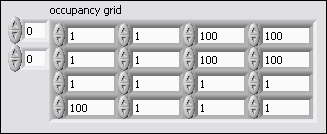
To create an occupancy grid map from this array, LabVIEW shifts the origin in the array and builds the map as shown in the following illustration.

The following illustration shows how the Occupancy Grid Map VIs define the x- and y-coordinates of cells in a 4 × 4 occupancy grid map.

Examples
Refer to the following VIs for examples of using the Create Occupancy Grid Map VI:
- labview\examples\robotics\Path Planning\ADstar\ADstar on Occupancy Grid\Anytime D Star on an Occupancy Grid.lvproj
- labview\examples\robotics\Path Planning\Astar\Astar on Occupancy Grid\Astar on Occupancy Grid.lvproj