Creating a Plugin-Based Test Application
- Updated2023-02-17
- 3 minute(s) read
Creating a Plugin-Based Test Application
Use Execution Control nodes to create an extensible application. Extend your application so you can add components, such as plugins, to it after you build it.
Note A plugin is a library component that has
Identify library as a plugin enabled in its
metadata.
What to Use
What to Do
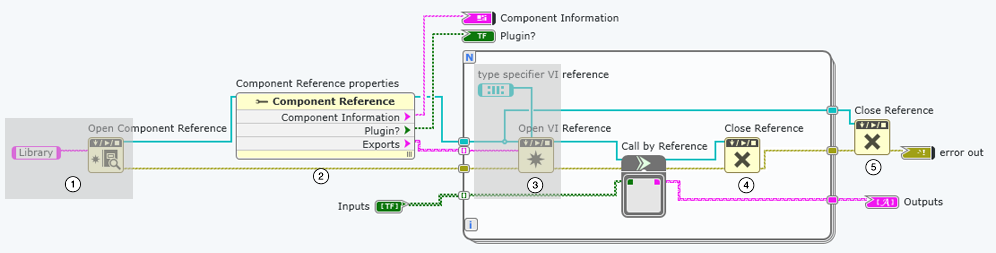
Create the following diagram to make a plugin-based test application.
Customize the gray sections for your unique programming goals.

|
Open Component Reference
returns a reference to a library component (or GLL) you specify with
a name string. Note Do not include the file extension in the component name
string. |

|
Component Reference properties reads the properties of a component reference you open with Open Component Reference. Wire the appropriate data type terminals to Component Information and Plugin? to review component metadata and determine whether the component is a plugin. Wire the Exports terminal to vi name in Open VI Reference to iterate over and run the exported VIs in the plugin. |

|
Open VI Reference returns a reference to a VI you
specify with a name string. Wire component
reference to open a VI from a specific library.
Note You must
wire a strictly typed VI reference to type specifier
VI reference. The connector pane of the VI
specified by vi name must match the
connector pane of the VI wired to type specifier VI
reference. |

|
Close Reference closes a reference to an open VI. |

|
Close Reference closes a reference to an open component. |
Troubleshooting
- Make sure the connector pane of each exported VI in your component matches the connector pane of the type specifier VI reference. Refer to the Details tab of the Open VI Reference node for criteria for opening strictly typed reference.
- Make sure the expected plugins have Identify library as a plugin enabled in the metadata. To identify library component as a plugin, open the Library document and enable the Identify library as a plugin option from the Document tab.