Set Matrix Subset VI
- Updated2023-02-21
- 20 minute(s) read
Set Matrix Subset VI
Owning Palette: Matrix VIs
Requires: Multicore Analysis and Sparse Matrix Toolkit
Sets a subset in a sparse matrix.
You must manually select the polymorphic instance you want to use.
Set Sparse Matrix Element (DBL)

 |
Sparse Matrix in specifies the input sparse matrix. |
 |
row index specifies the row index at which LabVIEW sets new element. The row index must be non-negative. The default is 0. |
|
column index specifies the row index at which LabVIEW sets new element. The column index must be non-negative. The default is 0. |
 |
error in describes error conditions that occur before this node runs. This input provides standard error in functionality. |
 |
new element specifies the element to set at row index and column index. |
 |
Sparse Matrix out returns Sparse Matrix in with new element. If Sparse Matrix in already has an element at row index and column index, LabVIEW replaces the element with new element. Otherwise, LabVIEW adds new element into Sparse Matrix out. If row index or column index is greater than or equal to the number of rows or columns in Sparse Matrix in, LabVIEW resizes Sparse Matrix out to receive new element at the corresponding position. |
 |
error out contains error information. This output provides standard error out functionality. |
Set Sparse Matrix Element (SGL)

|
Sparse Matrix in specifies the input sparse matrix. |
|
row index specifies the row index at which LabVIEW sets new element. The row index must be non-negative. The default is 0. |
|
column index specifies the row index at which LabVIEW sets new element. The column index must be non-negative. The default is 0. |
|
error in describes error conditions that occur before this node runs. This input provides standard error in functionality. |
 |
new element specifies the element to set at row index and column index. |
|
Sparse Matrix out returns Sparse Matrix in with new element. If Sparse Matrix in already has an element at row index and column index, LabVIEW replaces the element with new element. Otherwise, LabVIEW adds new element into Sparse Matrix out. If row index or column index is greater than or equal to the number of rows or columns in Sparse Matrix in, LabVIEW resizes Sparse Matrix out to receive new element at the corresponding position. |
|
error out contains error information. This output provides standard error out functionality. |
Set Sparse Matrix Element (CDB)

|
Sparse Matrix in specifies the input sparse matrix. |
|
row index specifies the row index at which LabVIEW sets new element. The row index must be non-negative. The default is 0. |
|
column index specifies the row index at which LabVIEW sets new element. The column index must be non-negative. The default is 0. |
|
error in describes error conditions that occur before this node runs. This input provides standard error in functionality. |
 |
new element specifies the element to set at row index and column index. |
|
Sparse Matrix out returns Sparse Matrix in with new element. If Sparse Matrix in already has an element at row index and column index, LabVIEW replaces the element with new element. Otherwise, LabVIEW adds new element into Sparse Matrix out. If row index or column index is greater than or equal to the number of rows or columns in Sparse Matrix in, LabVIEW resizes Sparse Matrix out to receive new element at the corresponding position. |
|
error out contains error information. This output provides standard error out functionality. |
Set Sparse Matrix Element (CSG)

|
Sparse Matrix in specifies the input sparse matrix. |
|
row index specifies the row index at which LabVIEW sets new element. The row index must be non-negative. The default is 0. |
|
column index specifies the row index at which LabVIEW sets new element. The column index must be non-negative. The default is 0. |
|
error in describes error conditions that occur before this node runs. This input provides standard error in functionality. |
 |
new element specifies the element to set at row index and column index. |
|
Sparse Matrix out returns Sparse Matrix in with new element. If Sparse Matrix in already has an element at row index and column index, LabVIEW replaces the element with new element. Otherwise, LabVIEW adds new element into Sparse Matrix out. If row index or column index is greater than or equal to the number of rows or columns in Sparse Matrix in, LabVIEW resizes Sparse Matrix out to receive new element at the corresponding position. |
|
error out contains error information. This output provides standard error out functionality. |
Set Sparse Matrix Multi Elem (DBL)

|
Sparse Matrix in specifies the input sparse matrix. |
 |
Row Indices specifies an array of row indices at which LabVIEW sets New Elements. The number of elements in Row Indices must be equal to the number of elements in Column Indices. All elements in Row Indices must be non-negative. |
|
Column Indices specifies an array of column indices at which LabVIEW sets New Elements. The number of elements in Column Indices must be equal to the number of elements in Row Indices. All elements in Column Indices must be non-negative. |
|
error in describes error conditions that occur before this node runs. This input provides standard error in functionality. |
 |
New Elements specifies an array of elements to set at Row Indices and Column Indices. The number of elements in New Elements must be equal to the number of elements in Row Indices and Column Indices. |
|
Sparse Matrix out returns Sparse Matrix in with New Elements. If Sparse Matrix in already has elements at Row Indices and Column Indices, LabVIEW replaces the elements with New Elements. Otherwise, LabVIEW adds New Elements into Sparse Matrix out. If Row Indices or Column Indices is greater than or equal to the number of rows or columns in Sparse Matrix in, LabVIEW resizes Sparse Matrix out to receive New Elements at the corresponding position. If two or more elements have identical row and column indices, LabVIEW receives the last element of New Elements in Sparse Matrix out. |
|
error out contains error information. This output provides standard error out functionality. |
Set Sparse Matrix Multi Elem (SGL)
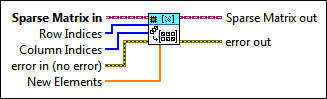
|
Sparse Matrix in specifies the input sparse matrix. |
|
Row Indices specifies an array of row indices at which LabVIEW sets New Elements. The number of elements in Row Indices must be equal to the number of elements in Column Indices. All elements in Row Indices must be non-negative. |
|
Column Indices specifies an array of column indices at which LabVIEW sets New Elements. The number of elements in Column Indices must be equal to the number of elements in Row Indices. All elements in Column Indices must be non-negative. |
|
error in describes error conditions that occur before this node runs. This input provides standard error in functionality. |
 |
New Elements specifies an array of elements to set at Row Indices and Column Indices. The number of elements in New Elements must be equal to the number of elements in Row Indices and Column Indices. |
|
Sparse Matrix out returns Sparse Matrix in with New Elements. If Sparse Matrix in already has elements at Row Indices and Column Indices, LabVIEW replaces the elements with New Elements. Otherwise, LabVIEW adds New Elements into Sparse Matrix out. If Row Indices or Column Indices is greater than or equal to the number of rows or columns in Sparse Matrix in, LabVIEW resizes Sparse Matrix out to receive New Elements at the corresponding position. If two or more elements have identical row and column indices, LabVIEW receives the last element of New Elements in Sparse Matrix out. |
|
error out contains error information. This output provides standard error out functionality. |
Set Sparse Matrix Multi Elem (CDB)
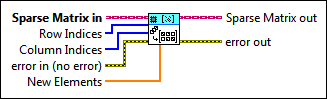
|
Sparse Matrix in specifies the input sparse matrix. |
|
Row Indices specifies an array of row indices at which LabVIEW sets New Elements. The number of elements in Row Indices must be equal to the number of elements in Column Indices. All elements in Row Indices must be non-negative. |
|
Column Indices specifies an array of column indices at which LabVIEW sets New Elements. The number of elements in Column Indices must be equal to the number of elements in Row Indices. All elements in Column Indices must be non-negative. |
|
error in describes error conditions that occur before this node runs. This input provides standard error in functionality. |
 |
New Elements specifies an array of elements to set at Row Indices and Column Indices. The number of elements in New Elements must be equal to the number of elements in Row Indices and Column Indices. |
|
Sparse Matrix out returns Sparse Matrix in with New Elements. If Sparse Matrix in already has elements at Row Indices and Column Indices, LabVIEW replaces the elements with New Elements. Otherwise, LabVIEW adds New Elements into Sparse Matrix out. If Row Indices or Column Indices is greater than or equal to the number of rows or columns in Sparse Matrix in, LabVIEW resizes Sparse Matrix out to receive New Elements at the corresponding position. If two or more elements have identical row and column indices, LabVIEW receives the last element of New Elements in Sparse Matrix out. |
|
error out contains error information. This output provides standard error out functionality. |
Set Sparse Matrix Multi Elem (CSG)

|
Sparse Matrix in specifies the input sparse matrix. |
|
Row Indices specifies an array of row indices at which LabVIEW sets New Elements. The number of elements in Row Indices must be equal to the number of elements in Column Indices. All elements in Row Indices must be non-negative. |
|
Column Indices specifies an array of column indices at which LabVIEW sets New Elements. The number of elements in Column Indices must be equal to the number of elements in Row Indices. All elements in Column Indices must be non-negative. |
|
error in describes error conditions that occur before this node runs. This input provides standard error in functionality. |
 |
New Elements specifies an array of elements to set at Row Indices and Column Indices. The number of elements in New Elements must be equal to the number of elements in Row Indices and Column Indices. |
|
Sparse Matrix out returns Sparse Matrix in with New Elements. If Sparse Matrix in already has elements at Row Indices and Column Indices, LabVIEW replaces the elements with New Elements. Otherwise, LabVIEW adds New Elements into Sparse Matrix out. If Row Indices or Column Indices is greater than or equal to the number of rows or columns in Sparse Matrix in, LabVIEW resizes Sparse Matrix out to receive New Elements at the corresponding position. If two or more elements have identical row and column indices, LabVIEW receives the last element of New Elements in Sparse Matrix out. |
|
error out contains error information. This output provides standard error out functionality. |
Set Sparse Matrix Row (DBL)
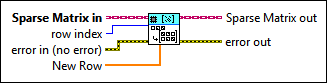
|
Sparse Matrix in specifies the input sparse matrix. |
|
row index specifies the index at which LabVIEW sets New Row. The row index must be non-negative. The default is 0. |
|
error in describes error conditions that occur before this node runs. This input provides standard error in functionality. |
|
New Row specifies the row to set at row index. The number of elements in New Row must be equal to the number of columns in Sparse Matrix in. |
|
Sparse Matrix out returns Sparse Matrix in with New Row. If Sparse Matrix in already has a row at row index, LabVIEW replaces the row with New Row. Otherwise, LabVIEW adds New Row to Sparse Matrix out. If row index is greater than or equal to the number of rows in Sparse Matrix in, LabVIEW appends New Row to Sparse Matrix out at the corresponding position. |
|
error out contains error information. This output provides standard error out functionality. |
Set Sparse Matrix Row (SGL)

|
Sparse Matrix in specifies the input sparse matrix. |
|
row index specifies the index at which LabVIEW sets New Row. The row index must be non-negative. The default is 0. |
|
error in describes error conditions that occur before this node runs. This input provides standard error in functionality. |
|
New Row specifies the row to set at row index. The number of elements in New Row must be equal to the number of columns in Sparse Matrix in. |
|
Sparse Matrix out returns Sparse Matrix in with New Row. If Sparse Matrix in already has a row at row index, LabVIEW replaces the row with New Row. Otherwise, LabVIEW adds New Row to Sparse Matrix out. If row index is greater than or equal to the number of rows in Sparse Matrix in, LabVIEW appends New Row to Sparse Matrix out at the corresponding position. |
|
error out contains error information. This output provides standard error out functionality. |
Set Sparse Matrix Row (CDB)
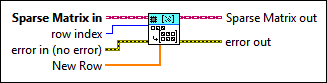
|
Sparse Matrix in specifies the input sparse matrix. |
|
row index specifies the index at which LabVIEW sets New Row. The row index must be non-negative. The default is 0. |
|
error in describes error conditions that occur before this node runs. This input provides standard error in functionality. |
|
New Row specifies the row to set at row index. The number of elements in New Row must be equal to the number of columns in Sparse Matrix in. |
|
Sparse Matrix out returns Sparse Matrix in with New Row. If Sparse Matrix in already has a row at row index, LabVIEW replaces the row with New Row. Otherwise, LabVIEW adds New Row to Sparse Matrix out. If row index is greater than or equal to the number of rows in Sparse Matrix in, LabVIEW appends New Row to Sparse Matrix out at the corresponding position. |
|
error out contains error information. This output provides standard error out functionality. |
Set Sparse Matrix Row (CSG)

|
Sparse Matrix in specifies the input sparse matrix. |
|
row index specifies the index at which LabVIEW sets New Row. The row index must be non-negative. The default is 0. |
|
error in describes error conditions that occur before this node runs. This input provides standard error in functionality. |
|
New Row specifies the row to set at row index. The number of elements in New Row must be equal to the number of columns in Sparse Matrix in. |
|
Sparse Matrix out returns Sparse Matrix in with New Row. If Sparse Matrix in already has a row at row index, LabVIEW replaces the row with New Row. Otherwise, LabVIEW adds New Row to Sparse Matrix out. If row index is greater than or equal to the number of rows in Sparse Matrix in, LabVIEW appends New Row to Sparse Matrix out at the corresponding position. |
|
error out contains error information. This output provides standard error out functionality. |
Set Sparse Matrix Column (DBL)

|
Sparse Matrix in specifies the input sparse matrix. |
|
column index specifies the index at which LabVIEW sets New Column. The column index must be non-negative. The default is 0. |
|
error in describes error conditions that occur before this node runs. This input provides standard error in functionality. |
|
New Column specifies the column to set at column index. The number of elements in New Column must be equal to the number of rows in Sparse Matrix in. |
|
Sparse Matrix out returns Sparse Matrix in with New Column. If Sparse Matrix in already has a column at column index, LabVIEW replaces the column with New Column. Otherwise, LabVIEW adds New Column to Sparse Matrix out. If column index is greater than or equal to the number of columns in Sparse Matrix in, LabVIEW appends New Column to Sparse Matrix out at the corresponding position. |
|
error out contains error information. This output provides standard error out functionality. |
Set Sparse Matrix Column (SGL)

|
Sparse Matrix in specifies the input sparse matrix. |
|
column index specifies the index at which LabVIEW sets New Column. The column index must be non-negative. The default is 0. |
|
error in describes error conditions that occur before this node runs. This input provides standard error in functionality. |
|
New Column specifies the column to set at column index. The number of elements in New Column must be equal to the number of rows in Sparse Matrix in. |
|
Sparse Matrix out returns Sparse Matrix in with New Column. If Sparse Matrix in already has a column at column index, LabVIEW replaces the column with New Column. Otherwise, LabVIEW adds New Column to Sparse Matrix out. If column index is greater than or equal to the number of columns in Sparse Matrix in, LabVIEW appends New Column to Sparse Matrix out at the corresponding position. |
|
error out contains error information. This output provides standard error out functionality. |
Set Sparse Matrix Column (CDB)
|
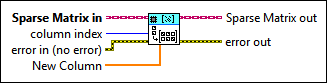
Sparse Matrix in specifies the input sparse matrix. |
|
column index specifies the index at which LabVIEW sets New Column. The column index must be non-negative. The default is 0. |
|
error in describes error conditions that occur before this node runs. This input provides standard error in functionality. |
|
New Column specifies the column to set at column index. The number of elements in New Column must be equal to the number of rows in Sparse Matrix in. |
|
Sparse Matrix out returns Sparse Matrix in with New Column. If Sparse Matrix in already has a column at column index, LabVIEW replaces the column with New Column. Otherwise, LabVIEW adds New Column to Sparse Matrix out. If column index is greater than or equal to the number of columns in Sparse Matrix in, LabVIEW appends New Column to Sparse Matrix out at the corresponding position. |
|
error out contains error information. This output provides standard error out functionality. |
Set Sparse Matrix Column (CSG)

|
Sparse Matrix in specifies the input sparse matrix. |
|
column index specifies the index at which LabVIEW sets New Column. The column index must be non-negative. The default is 0. |
|
error in describes error conditions that occur before this node runs. This input provides standard error in functionality. |
|
New Column specifies the column to set at column index. The number of elements in New Column must be equal to the number of rows in Sparse Matrix in. |
|
Sparse Matrix out returns Sparse Matrix in with New Column. If Sparse Matrix in already has a column at column index, LabVIEW replaces the column with New Column. Otherwise, LabVIEW adds New Column to Sparse Matrix out. If column index is greater than or equal to the number of columns in Sparse Matrix in, LabVIEW appends New Column to Sparse Matrix out at the corresponding position. |
|
error out contains error information. This output provides standard error out functionality. |
Set Matrix Subset Details
The following table lists the support characteristics of this VI.
| Supported on RT targets | Yes |
| Suitable for bounded execution times on RT | No |
Setting an Element or Multiple Elements
LabVIEW sets new elements into a sparse matrix even if the elements are explicitly zeros.
Setting a Row or Column
LabVIEW sets only non-zero elements in a new row or new column into a sparse matrix. LabVIEW does not receive zero elements in a new row or new column into the output sparse matrix.