Reference Levels VI
- Updated2023-02-21
- 13 minute(s) read
Reference Levels VI
Owning Palette: Level VIs
Requires: Jitter Analysis Toolkit
Computes reference levels based on an input waveform or on state levels computed before this VI runs. LabVIEW uses the reference levels to define the boundaries of edges in waveforms. Wire data to the state levels settings input and the waveform input to determine the polymorphic instance to use or manually select the instance.
Reference Levels (waveform in, DBL)
Use this polymorphic instance to calculate the reference levels of a waveform when you do not know its high and low state levels.
This instance operates on the waveform data type when the Y data values are double-precision, floating-point numeric values. Use the I8 instance of this VI with integer data to reduce the size of the data and the memory usage.

 |
waveform is the waveform to measure.
| ||||||||||||||||||||
 |
state levels settings sets the method this VI uses to determine the high and low state levels of a waveform.
| ||||||||||||||||||||
|
reference levels settings defines how this VI measures the reference levels of the waveform.
| ||||||||||||||||||||
 |
error in describes error conditions that occur before this node runs. This input provides standard error in functionality. | ||||||||||||||||||||
 |
waveform dup returns waveform unchanged. | ||||||||||||||||||||
 |
state levels returns the state level information from the waveform.
| ||||||||||||||||||||
|
reference levels contains the high, middle, and low reference levels of a waveform in absolute units.
| ||||||||||||||||||||
 |
error out contains error information. This output provides standard error out functionality. |


Reference Levels (waveform in, I8)
Use this polymorphic instance to calculate the reference levels of a waveform when you do not know its high and low state levels.
This instance operates on the waveform data type when the Y data values are 8-bit signed integers.
|
waveform is the waveform to measure.
| ||||||||||||||||||||
|
state levels settings sets the method this VI uses to determine the high and low state levels of a waveform.
| ||||||||||||||||||||
|
reference levels settings defines how this VI measures the reference levels of the waveform.
| ||||||||||||||||||||
|
error in describes error conditions that occur before this node runs. This input provides standard error in functionality. | ||||||||||||||||||||
|
waveform dup returns waveform unchanged. | ||||||||||||||||||||
|
state levels returns the state level information from the waveform.
| ||||||||||||||||||||
|
reference levels contains the high, middle, and low reference levels of a waveform in absolute units.
| ||||||||||||||||||||
|
error out contains error information. This output provides standard error out functionality. |

Reference Levels (states in)
Use this polymorphic instance to calculate the reference levels of a waveform from high and low state levels computed before this VI runs.

|
state levels specifies the high and low state values in the waveform and the corresponding amplitude. You can use the State Levels VI to generate this cluster.
| ||||||||||||
|
reference levels settings defines how this VI measures the reference levels of the waveform.
| ||||||||||||
|
error in describes error conditions that occur before this node runs. This input provides standard error in functionality. | ||||||||||||
|
state levels dup returns the state levels unchanged.
| ||||||||||||
|
reference levels contains the high, middle, and low reference levels of a waveform in absolute units.
| ||||||||||||
|
error out contains error information. This output provides standard error out functionality. |
Reference Levels Details
When ref units is percent, this VI uses the following equation to compute the reference levels:
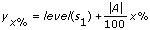
where yx% is the value of a particular reference level
level(s1) is the low state level
A is the difference of the high and low state levels, or amplitude
x represents the percentage for that reference level that you specify in reference levels settings.
Examples
Refer to the following VIs for examples of using the Reference Levels VI:
- Basic Eye Diagram VI: labview\examples\Jitter Analysis\Eye Diagram Measurements
- Simulated Signal with Jitter VI: labview\examples\Jitter Analysis\Jitter Measurements
- Overshoot Demo VI: labview\examples\Jitter Analysis\Level Measurements