Execution Order of Callback API Functions (Control Design and Simulation Module)
- Updated2023-03-14
- 4 minute(s) read
In many other software applications, when you create an ordinary differential equation (ODE) solver, you define the right-hand-sides function of the ODE and then pass a pointer to that function through to the solver. The solver contains an internal loop that calls the right-hand-sides function as many times as necessary to advance the simulation.
In the LabVIEW Control Design and Simulation Module, you create an external ODE solver in C/C++, and the solver provides a set of Callback API functions to LabVIEW. The solver must export all Callback API functions. The Control Design and Simulation Module calls these functions in a predefined sequence. When necessary, the Control Design and Simulation Module evaluates the right-hand-sides function of the ODE.
The order in which the Control Design and Simulation Module executes the Callback API functions depends on whether the solver has a variable or fixed step size.
Variable Step-Size Solvers
A variable step-size solver evaluates whether each major step satisfies the relative tolerance and absolute tolerance values and proposes the next step size after each major step.
The following flowchart illustrates the execution order of a variable step-size ODE solver.
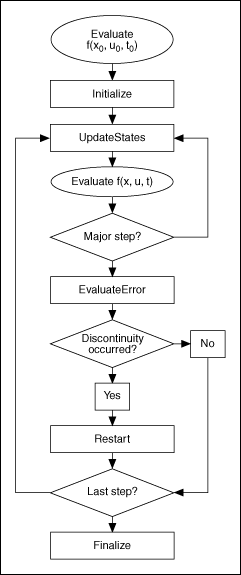
The n-vector function f(x,u,t) is the right-hand-sides function of the ODE. x is the states and is an n-dimensional vector, u is the input to the model and is m-dimensional, and t is time. The ellipses represent evaluations of the right-hand-sides function, the rectangles represent Callback API functions in the ODE solver, and the diamond represents a decision point within the execution order.
The Control Design and Simulation Module first sets the states of the solver to the initial values you specify and evaluates the right-hand-sides function of the ODE at the initial time, initial state values, and initial input values. The Control Design and Simulation Module mandates the step size, and the solver can request the step size any time from initialization onward. The Control Design and Simulation Module then calls the Initialize function to perform any tasks required before the simulation starts.
After the Control Design and Simulation Module calls the Initialize function of the external solver, the UpdateStates function provides the first state update for the state values of the model. The UpdateStates function specifies the state and time values at which the Control Design and Simulation Module evaluates the right-hand-sides function of the ODE. The SetIsMajorStep function within the UpdateStates function specifies whether the next step is a minor or a major step.
The Control Design and Simulation Module must consider several competing factors when it calculates the time for the next simulation step. The simulation might contain Discrete Linear Systems functions that require a step at a particular fixed rate. The simulation also might contain a Detect Zero Crossing function that requires a step just before and just after a signal crosses a particular threshold. The simulation might contain other functions, such as Signal Generation functions, that require a step just before and just after a particular time. Each of these competing factors and the ODE solver nominate a step size. The Control Design and Simulation Module then takes the smallest nominated step size.
After a major step, the Control Design and Simulation Module evaluates the state derivatives at the current state and time values and then calls the EvaluateError function. The EvaluateError function evaluates whether the current major step satisfies the relative and absolute error tolerance values for the ODE solver.
If the step satisfies the tolerance values and a discontinuity in a continuous signal occurs, the Control Design and Simulation Module calls the Restart function. This function restarts the ODE solver after the discontinuity.
When the Control Design and Simulation Module determines that the simulation has reached the final time, the Control Design and Simulation Module calls the Finalize function. During the execution of this function, the solver can perform any finalization tasks such as releasing any memory allocated with the Initialize function.
 |
Note The Information function specifies a name for the solver. The Control Design and Simulation Module calls this function only when you launch the Configure Simulation Parameters dialog box. |
Fixed Step-Size Solvers
Fixed step-size solvers proceed as a series of frames. Each frame consists of a fixed number of minor steps followed by a major step. The following flowchart illustrates the execution order of each step for a fixed step-size solver.

The n-vector function f(x,u,t) is the right-hand-sides function of the ODE. x is the states and is an n-dimensional vector, u is the input to the model and is m-dimensional, and t is time. The ellipses represent evaluations of the right-hand-sides function, the rectangles represent Callback API functions in the ODE solver, and the diamond represents a decision point within the execution order.
After the Control Design and Simulation Module calls the Initialize function of the external solver, the UpdateStates function provides the first state update for the state values of the model. The UpdateStates function specifies the state and time values at which the Control Design and Simulation Module evaluates the right-hand-sides function of the ODE. The SetIsMajorStep function within the UpdateStates function specifies whether the next step is a minor or a major step.
When the Control Design and Simulation Module determines that the simulation has reached the final time, the Control Design and Simulation Module calls the Finalize function. During the execution of this function, the solver can perform any finalization tasks such as releasing any memory allocated with the Initialize function.