Introduction to Control Design (Control Design and Simulation Module)
- Updated2023-03-14
- 3 minute(s) read
 |
Note This topic serves as a brief introduction to control design. Refer to the LabVIEW Control Design User Manual for more information about the control design process. |
Control design is a process that involves developing mathematical models that describe a physical system, analyzing the models to learn about their dynamic characteristics, and creating a controller to achieve certain dynamic characteristics. Control systems contain components that direct, command, and regulate the physical system, also known as the plant. In this documentation, control system refers to the sensors, the controller, and the actuators. The reference input refers to a condition of the system that you specify. The following dynamic system refers to the combination of the control system and the plant.
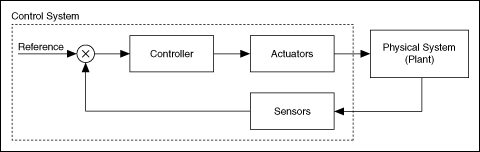
The dynamic system in the previous figure represents a closed-loop system, also known as a feedback system. In closed-loop systems, the control system monitors the outputs of the plant and adjusts the inputs to the plant to make the actual response closer to the input that you designate.
Constructing Dynamic System Models
Model-based control design relies upon the concept of a dynamic system model. A dynamic system model is a mathematical representation of the dynamics between the inputs and outputs of a dynamic system. You generally represent dynamic system models with differential equations or difference equations.
Obtaining a model of the dynamic system you want to control is the first step in model-based control design. You analyze this model to anticipate the outputs of the system when given a set of inputs. Using this analysis, you then can design a controller that affects the outputs of the dynamic system in a manner that you specify. You might create a linear model of the plant in the form of a transfer function, zero-pole-gain, or state-space form.
|
Note Refer to the LabVIEW Control Design User Manual for more information about constructing and analyzing models. |
The second step of model-based control design involves a process of analyzing the plant model obtained during the system identification process. Simulate the model in an open loop to analyze its behavior. Then, design a controller to integrate into the system and close the loop. The following illustration shows the typical steps involved in designing a controller.

LabVIEW Control Design Tools
The Control Design and Simulation Module provides several tools for designing a controller based on a model of a plant. Choose from the following options for designing a controller:
- Interactive design—Use the SISO Controller function or CD Interactive Control Design VI to interactively design and analyze controllers for continuous, single-input single-output (SISO) dynamic systems.
- Programmatic design—Use the Control Design VIs and other tools to design controllers programmatically. These features use both classical and state-space techniques and support continuous or discrete SISO, single-input multiple-output (SIMO), multiple-input single-output (MISO), and multiple-input multiple-output (MIMO) system models. Refer to the LabVIEW Control Design User Manual for information about using the Control Design VIs to design, analyze, and deploy controllers for dynamic systems.