CD Select IO from Model VI
- Updated2023-03-14
- 6 minute(s) read
CD Select IO from Model VI
Owning Palette: Model Reduction VIs
Requires: Control Design and Simulation Module
Selects the inputs, outputs, and/or states that you want to keep from the original system model. If you want to remove inputs, outputs, or states from the original system model, use the CD Remove IO from Model VI. Wire data to the State-Space Model input to determine the polymorphic instance to use or manually select the instance.
 | Note If you specify a value of [–1] for the States, Inputs, or Outputs parameter, this VI selects all model states/inputs/outputs, respectively. |
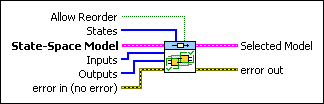
CD Select IO from State-Space Model
 |
Allow Reorder is TRUE if you want this VI to reorder the model states/inputs/outputs in the order you select them. Allow Reorder is FALSE if you do not want to reorder the states/inputs/outputs. The default value is FALSE. For example, consider a model with three outputs in the following order:
You specify a value of [1 0] for the Outputs parameter. If Allow Reorder? is FALSE, the Selected Model contains the first two outputs in the original order. However, if Allow Reorder? is TRUE, the Selected Model contains the first two outputs in the following order:
|
||||||||||||||
 |
States is the index number of the states you want to select from the State-Space Model. The index is zero-based. If you wire a value of –1 to this parameter, this VI selects all model states. | ||||||||||||||
 |
State-Space Model contains a mathematical representation of and information about the system of which this VI keeps the states, inputs and/or outputs in the resulting model. | ||||||||||||||
|
Inputs specifies the index numbers of the inputs you want to select from the system model. The index is zero-based. If you wire a value of –1 to this parameter, this VI selects all model inputs. | ||||||||||||||
|
Outputs specifies the index numbers of the outputs you want to select from the system model. The index is zero-based. If you wire a value of –1 to this parameter, this VI selects all model outputs. | ||||||||||||||
 |
error in describes error conditions that occur before this node runs. This input provides standard error in functionality. | ||||||||||||||
 |
Selected Model is the resulting system model with only the states, inputs, or outputs you selected. To access and modify the data in the model, use the Model Information VIs. | ||||||||||||||
 |
error out contains error information. This output provides standard error out functionality. |
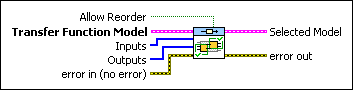
CD Select IO from Transfer Function Model
|
Allow Reorder is TRUE if you want this VI to reorder the model states/inputs/outputs in the order you select them. Allow Reorder is FALSE if you do not want to reorder the states/inputs/outputs. The default value is FALSE. For example, consider a model with three outputs in the following order:
You specify a value of [1 0] for the Outputs parameter. If Allow Reorder? is FALSE, the Selected Model contains the first two outputs in the original order. However, if Allow Reorder? is TRUE, the Selected Model contains the first two outputs in the following order:
|
||||||||||||||
|
Transfer Function Model contains a mathematical representation of and information about the system in which this VI keeps the inputs and/or outputs in the resulting model. | ||||||||||||||
|
Inputs specifies the index numbers of the inputs you want to select from the system model. The index is zero-based. If you wire a value of –1 to this parameter, this VI selects all model inputs. | ||||||||||||||
|
Outputs specifies the index numbers of the outputs you want to select from the system model. The index is zero-based. If you wire a value of –1 to this parameter, this VI selects all model outputs. | ||||||||||||||
|
error in describes error conditions that occur before this node runs. This input provides standard error in functionality. | ||||||||||||||
|
Selected Model is the resulting system model with only the states, inputs, or outputs you selected. To access and modify the data in the model, use the Model Information VIs. | ||||||||||||||
|
error out contains error information. This output provides standard error out functionality. |
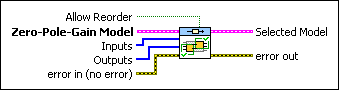
CD Select IO from Zero-Pole-Gain Model
|
Allow Reorder is TRUE if you want this VI to reorder the model states/inputs/outputs in the order you select them. Allow Reorder is FALSE if you do not want to reorder the states/inputs/outputs. The default value is FALSE. For example, consider a model with three outputs in the following order:
You specify a value of [1 0] for the Outputs parameter. If Allow Reorder? is FALSE, the Selected Model contains the first two outputs in the original order. However, if Allow Reorder? is TRUE, the Selected Model contains the first two outputs in the following order:
|
||||||||||||||
|
Zero-Pole-Gain Model contains a mathematical representation of and information about the system in which this VI keeps the inputs and/or outputs in the resulting model. | ||||||||||||||
|
Inputs specifies the index numbers of the inputs you want to select from the system model. The index is zero-based. If you wire a value of –1 to this parameter, this VI selects all model inputs. | ||||||||||||||
|
Outputs specifies the index numbers of the outputs you want to select from the system model. The index is zero-based. If you wire a value of –1 to this parameter, this VI selects all model outputs. | ||||||||||||||
|
error in describes error conditions that occur before this node runs. This input provides standard error in functionality. | ||||||||||||||
|
Selected Model is the resulting system model with only the states, inputs, or outputs you selected. To access and modify the data in the model, use the Model Information VIs. | ||||||||||||||
|
error out contains error information. This output provides standard error out functionality. |
CD Select IO from Model Details
This VI supports delays. Refer to the LabVIEW Control Design User Manual for more information about delays.