CD Nyquist VI
- Updated2023-03-14
- 20 minute(s) read
CD Nyquist VI
Owning Palette: Frequency Response VIs
Requires: Control Design and Simulation Module
Produces the Nyquist plot of the input system for which this VI plots the imaginary part of the frequency response against its real part. You can display this data in the CD Nyquist Plot indicator. Wire data to the State-Space Model and Frequency Range inputs to determine the polymorphic instance to use or manually select the instance.
This VI converts state-space and zero-pole-gain models into transfer function models before determining the frequency response.
CD Nyquist (Frequency Range, State-Space)

 |
Separate Contour?, if TRUE, produces two plots: one that represents the positive frequencies and one for negative frequencies. Otherwise, this VI produces one plot for both the positive and negative frequencies. Separating the plots allows you to verify the direction of negative frequencies. | ||||||||||||||||||||||||||
 |
Nyquist Graph Reference is a reference to the Nyquist Plot on an XY graph. Nyquist Graph Reference configures the x-scale, y-scale, and legend properties. If you want to use the default settings or customize the settings for these properties, do not wire a value to this input. | ||||||||||||||||||||||||||
 |
State-Space Model contains a mathematical representation of and information about the system for which this VI produces a Nyquist plot. | ||||||||||||||||||||||||||
 |
Frequency Range contains the frequency information of the model.
| ||||||||||||||||||||||||||
 |
error in describes error conditions that occur before this node runs. This input provides standard error in functionality. | ||||||||||||||||||||||||||
 |
Plots Index is an array of clusters of the following two elements.
| ||||||||||||||||||||||||||
 |
Nyquist Plot returns the imaginary part of the complex frequency response of the input system this VI plots against its real part. The Plots Index input determines which plots to display on the XY graph. Right-click this terminal on the block diagram and select Create»Indicator from the shortcut menu to display this data in a CD Nyquist Plot indicator. | ||||||||||||||||||||||||||
 |
Nyquist Data returns information about the Nyquist plot data. To access the Nyquist Data, use the CD Get Frequency Response Data VI.
| ||||||||||||||||||||||||||
 |
error out contains error information. This output provides standard error out functionality. |


CD Nyquist (Frequency Range, Transfer Function)

|
Separate Contour?, if TRUE, produces two plots: one that represents the positive frequencies and one for negative frequencies. Otherwise, this VI produces one plot for both the positive and negative frequencies. Separating the plots allows you to verify the direction of negative frequencies. | ||||||||||||||||||||||||||
|
Nyquist Graph Reference is a reference to the Nyquist Plot on an XY graph. Nyquist Graph Reference configures the x-scale, y-scale, and legend properties. If you want to use the default settings or customize the settings for these properties, do not wire a value to this input. | ||||||||||||||||||||||||||
|
Transfer Function Model contains a mathematical representation of and information about the system for which this VI produces a Nyquist plot. | ||||||||||||||||||||||||||
|
Frequency Range contains the frequency information of the model.
| ||||||||||||||||||||||||||
|
error in describes error conditions that occur before this node runs. This input provides standard error in functionality. | ||||||||||||||||||||||||||
|
Plots Index is an array of clusters of the following two elements.
| ||||||||||||||||||||||||||
|
Nyquist Plot returns the imaginary part of the complex frequency response of the input system this VI plots against its real part. The Plots Index input determines which plots to display on the XY graph. Right-click this terminal on the block diagram and select Create»Indicator from the shortcut menu to display this data in a CD Nyquist Plot indicator. | ||||||||||||||||||||||||||
|
Nyquist Data returns information about the Nyquist plot data. To access the Nyquist Data, use the CD Get Frequency Response Data VI.
| ||||||||||||||||||||||||||
|
error out contains error information. This output provides standard error out functionality. |
CD Nyquist (Frequency Range, Zero-Pole-Gain)

|
Separate Contour?, if TRUE, produces two plots: one that represents the positive frequencies and one for negative frequencies. Otherwise, this VI produces one plot for both the positive and negative frequencies. Separating the plots allows you to verify the direction of negative frequencies. | ||||||||||||||||||||||||||
|
Nyquist Graph Reference is a reference to the Nyquist Plot on an XY graph. Nyquist Graph Reference configures the x-scale, y-scale, and legend properties. If you want to use the default settings or customize the settings for these properties, do not wire a value to this input. | ||||||||||||||||||||||||||
|
Zero-Pole-Gain Model contains a mathematical representation of and information about the system for which this VI produces a Nyquist plot. | ||||||||||||||||||||||||||
|
Frequency Range contains the frequency information of the model.
| ||||||||||||||||||||||||||
|
error in describes error conditions that occur before this node runs. This input provides standard error in functionality. | ||||||||||||||||||||||||||
|
Plots Index is an array of clusters of the following two elements.
| ||||||||||||||||||||||||||
|
Nyquist Plot returns the imaginary part of the complex frequency response of the input system this VI plots against its real part. The Plots Index input determines which plots to display on the XY graph. Right-click this terminal on the block diagram and select Create»Indicator from the shortcut menu to display this data in a CD Nyquist Plot indicator. | ||||||||||||||||||||||||||
|
Nyquist Data returns information about the Nyquist plot data. To access the Nyquist Data, use the CD Get Frequency Response Data VI.
| ||||||||||||||||||||||||||
|
error out contains error information. This output provides standard error out functionality. |
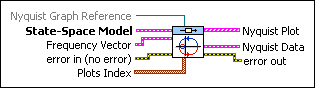
CD Nyquist (Frequency Vector, State-Space)
|
Nyquist Graph Reference is a reference to the Nyquist Plot on an XY graph. Nyquist Graph Reference configures the x-scale, y-scale, and legend properties. If you want to use the default settings or customize the settings for these properties, do not wire a value to this input. | ||||||||||||||||||||||||||
|
State-Space Model contains a mathematical representation of and information about the system for which this VI produces a Nyquist plot. | ||||||||||||||||||||||||||
|
Frequency Vector specifies information about the frequencies this VI uses to excite the model.
| ||||||||||||||||||||||||||
|
error in describes error conditions that occur before this node runs. This input provides standard error in functionality. | ||||||||||||||||||||||||||
|
Plots Index is an array of clusters of the following two elements.
| ||||||||||||||||||||||||||
|
Nyquist Plot returns the imaginary part of the complex frequency response of the input system this VI plots against its real part. The Plots Index input determines which plots to display on the XY graph. Right-click this terminal on the block diagram and select Create»Indicator from the shortcut menu to display this data in a CD Nyquist Plot indicator. | ||||||||||||||||||||||||||
|
Nyquist Data returns information about the Nyquist plot data. To access the Nyquist Data, use the CD Get Frequency Response Data VI.
| ||||||||||||||||||||||||||
|
error out contains error information. This output provides standard error out functionality. |

CD Nyquist (Frequency Vector, Transfer Function)

|
Nyquist Graph Reference is a reference to the Nyquist Plot on an XY graph. Nyquist Graph Reference configures the x-scale, y-scale, and legend properties. If you want to use the default settings or customize the settings for these properties, do not wire a value to this input. | ||||||||||||||||||||||||||
|
Transfer Function Model contains a mathematical representation of and information about the system for which this VI produces a Nyquist plot. | ||||||||||||||||||||||||||
|
Frequency Vector specifies information about the frequencies this VI uses to excite the model.
| ||||||||||||||||||||||||||
|
error in describes error conditions that occur before this node runs. This input provides standard error in functionality. | ||||||||||||||||||||||||||
|
Plots Index is an array of clusters of the following two elements.
| ||||||||||||||||||||||||||
|
Nyquist Plot returns the imaginary part of the complex frequency response of the input system this VI plots against its real part. The Plots Index input determines which plots to display on the XY graph. Right-click this terminal on the block diagram and select Create»Indicator from the shortcut menu to display this data in a CD Nyquist Plot indicator. | ||||||||||||||||||||||||||
|
Nyquist Data returns information about the Nyquist plot data. To access the Nyquist Data, use the CD Get Frequency Response Data VI.
| ||||||||||||||||||||||||||
|
error out contains error information. This output provides standard error out functionality. |
CD Nyquist (Frequency Vector, Zero-Pole-Gain)

|
Nyquist Graph Reference is a reference to the Nyquist Plot on an XY graph. Nyquist Graph Reference configures the x-scale, y-scale, and legend properties. If you want to use the default settings or customize the settings for these properties, do not wire a value to this input. | ||||||||||||||||||||||||||
|
Zero-Pole-Gain Model contains a mathematical representation of and information about the system for which this VI produces a Nyquist plot. | ||||||||||||||||||||||||||
|
Frequency Vector specifies information about the frequencies this VI uses to excite the model.
| ||||||||||||||||||||||||||
|
error in describes error conditions that occur before this node runs. This input provides standard error in functionality. | ||||||||||||||||||||||||||
|
Plots Index is an array of clusters of the following two elements.
| ||||||||||||||||||||||||||
|
Nyquist Plot returns the imaginary part of the complex frequency response of the input system this VI plots against its real part. The Plots Index input determines which plots to display on the XY graph. Right-click this terminal on the block diagram and select Create»Indicator from the shortcut menu to display this data in a CD Nyquist Plot indicator. | ||||||||||||||||||||||||||
|
Nyquist Data returns information about the Nyquist plot data. To access the Nyquist Data, use the CD Get Frequency Response Data VI.
| ||||||||||||||||||||||||||
|
error out contains error information. This output provides standard error out functionality. |
CD Nyquist Details
This VI supports delays. Refer to the LabVIEW Control Design User Manual for more information about delays.
Example
Refer to the CDEx Nyquist Analysis VI in the labview\examples\Control and Simulation\Control Design\Frequency Analysis directory for an example of using the CD Nyquist VI.