CD Convert Discrete to Continuous VI
- Updated2023-03-14
- 5 minute(s) read
CD Convert Discrete to Continuous VI
Owning Palette: Model Conversion VIs
Requires: Control Design and Simulation Module
Converts a discrete-time model to a continuous-time model by using the specified Method.Wire data to the Discrete State-Space Model input to determine the polymorphic instance to use or manually select the instance.
CD Convert Discrete to Continuous (State-Space)

 |
Prewarp Frequency (rad/s) calculates the continuous-time model with the inverse algorithm of the Tustin (bilinear) transformation with prewarping. | ||||||||||||
 |
Discrete State-Space Model is the discrete-time system model that this VI converts into a continuous-time equivalent. | ||||||||||||
 |
Method is the algorithm this VI uses to calculate the continuous-time equivalent of the discrete-time system model.
|
||||||||||||
 |
error in describes error conditions that occur before this node runs. This input provides standard error in functionality. | ||||||||||||
 |
Continuous State-Space Model is the continuous-time equivalent of the input discrete-time system model. To access and modify the data in the model, use the Model Information VIs. | ||||||||||||
 |
error out contains error information. This output provides standard error out functionality. |

 , where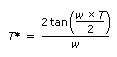


CD Convert Discrete to Continuous (Transfer Function)

|
Prewarp Frequency (rad/s) calculates the continuous-time model with the inverse algorithm of the Tustin (bilinear) transformation with prewarping. | ||||||||||||
|
Discrete Transfer Function Model is the discrete-time system model that this VI converts into a continuous-time equivalent. | ||||||||||||
|
Method is the algorithm this VI uses to calculate the continuous-time equivalent of the discrete-time system model.
|
||||||||||||
|
error in describes error conditions that occur before this node runs. This input provides standard error in functionality. | ||||||||||||
|
Continuous Transfer Function Model is the continuous-time equivalent of the input discrete-time system model. To access and modify the data in the model, use the Model Information VIs. | ||||||||||||
|
error out contains error information. This output provides standard error out functionality. |
CD Convert Discrete to Continuous (Zero-Pole-Gain)

|
Prewarp Frequency (rad/s) calculates the continuous-time model with the inverse algorithm of the Tustin (bilinear) transformation with prewarping. | ||||||||||||
|
Discrete Zero-Pole-Gain Model is the discrete-time system model that this VI converts into a continuous-time equivalent. | ||||||||||||
|
Method is the algorithm this VI uses to calculate the continuous-time equivalent of the discrete-time system model.
|
||||||||||||
|
error in describes error conditions that occur before this node runs. This input provides standard error in functionality. | ||||||||||||
|
Continuous Zero-Pole-Gain Model is the continuous-time equivalent of the input discrete-time system model. To access and modify the data in the model, use the Model Information VIs. | ||||||||||||
|
error out contains error information. This output provides standard error out functionality. |
CD Convert Discrete to Continuous Details
This VI supports delays. This VI multiplies delays by the sampling time in the conversion process. Refer to the LabVIEW Control Design User Manual for more information about delays.