Asynchronous Put File VI
- Updated2025-07-30
- 3 minute(s) read
Uploads a file or raw binary contents of a file to a remote WebDAV server or target. You must manually select the polymorphic instance you want to use. The request this VI generates can run in parallel with other asynchronous WebDAV requests. This VI times out if it exceeds the timeout value of the session that you set in the Asynchronous Open Session VI.
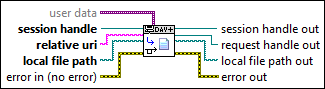
Inputs/Outputs
 user data
—
user data
—
user data specifies any data you want to include with the request handle. LabVIEW passes this data along with the request handle, but the data does not affect the request. LabVIEW returns user data in every WebDAV request event cluster. Use this input to pass WebDAV request-specific data within your VI.  session handle
—
session handle
—
session handle specifies the unique reference to the WebDAV session.  relative uri
—
relative uri
—
relative uri specifies the uniform resource identifier (URI) of the file or directory relative to the host uri prefix that you wire to the Open Session VI. A URI can be a uniform resource locator (URL), a uniform resource name (URN), or both. Format relative uri as directory/subdirectory/filename.  local file path
—
local file path
—
local file path is the local path to the file you want to upload.  error in (no error)
—
error in (no error)
—
error in describes error conditions that occur before this node runs. This input provides standard error in functionality.  session handle out
—
session handle out
—
session handle out returns the unique reference to the WebDAV session.
request handle out
—
request handle out returns the unique reference to the WebDAV request. You can wire this output only to other asynchronous WebDAV VIs.  local file path out
—
local file path out
—
local file path out returns the local path to the directory where the file you upload is located.  error out
—
error out
—
error out contains error information. This output provides standard error out functionality. |