TDMS Create Scaling Information (Linear) VI
- Updated2025-07-30
- 4 minute(s) read
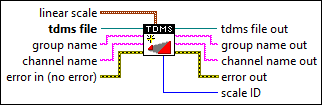
Creates scaling information for unscaled data in a .tdms file. This VI writes the scaling information to the .tdms file. You must manually select the polymorphic instance to use.
To call this VI with TDMS Advanced functions, only call the TDMS Set Channel Information function after any calls to this VI.
Use the TDMS File Viewer VI to retrieve the scaling information from a .tdms file.
Inputs/Outputs
 linear scale
—
linear scale
—
linear scale specifies the linear scaling information. A linear scale uses the equation y=mx+b, where x is a pre-scaled value, and y is a scaled value.
 tdms file
—
tdms file
—
tdms file specifies a reference number to the .tdms file on which to perform the operation. Use the TDMS Open function to open the refnum. group name and channel name take precedence over this input. If you specify a value for either group name or channel name, this VI applies the scaling information to either the group or the channel, respectively. If you do not specify a value for them, this VI applies the scaling information to the .tdms data.  group name
—
group name
—
group name specifies the group name for the .tdms data. This input takes precedence over tdms file but has a lower priority than channel name.
channel name
—
channel name specifies the channel name for the .tdms data. This input takes precedence over group name and tdms file. If you do not specify a value for channel name, this VI applies the scaling information to the group. If you do not specify a value for group name either, this VI applies the scaling information to the .tdms data.  error in (no error)
—
error in (no error)
—
error in describes error conditions that occur before this node runs. This input provides standard error in functionality.  tdms file out
—
tdms file out
—
tdms file out returns a TDMS file reference to the .tdms file on which you performed the operation.  group name out
—
group name out
—
group name out returns the name of the channel group on which you performed the operation.
channel name out
—
channel name out returns the name of the channel on which you performed the operation.  error out
—
error out
—
error out contains error information. This output provides standard error out functionality.  scale ID
—
scale ID
—
scale ID returns the ID of the resulting scale. |
 slope
—
slope
—
 input source
—
input source
—
Examples
Refer to the following example files included with LabVIEW.
- labview\examples\File IO\TDMS\Scale TDMS Data.vi