TDMS Convert Format VI
- Updated2025-07-30
- 4 minute(s) read
Converts the file format version of a .tdms file from 1.0 to 2.0 or vice versa. This VI overwrites the .tdms file with the new file format version you specify in the target version input. This VI also changes the byte order of the .tdms file to native, host order.
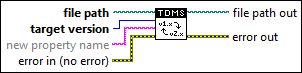
Inputs/Outputs
 file path
—
file path
—
file path specifies the path to the .tdms file you want to convert.  target version
—
target version
—
target version specifies the file format version to which you want to convert the .tdms file.
 new property name
—
new property name
—
new property name specifies a new name for the name property of a group or channel in the .tdms file. For example, if a group has a name property with a value TDMSDataGroup, and if you wire a value group name to this input and run this VI, the original name property of this group changes to group name, which has a value TDMSDataGroup. This VI creates a new name property for this group, and uses the group name that you specified when creating this .tdms file as the property value. This input is valid only when target version is 2.0.  error in (no error)
—
error in (no error)
—
error in describes error conditions that occur before this node runs. This input provides standard error in functionality.  file path out
—
file path out
—
file path out returns the path of the .tdms file on which you performed the operation.  error out
—
error out
—
error out contains error information. This output provides standard error out functionality. |
When converting a .tdms file from file format version 1.0 to 2.0, this VI makes the following changes to the properties of the .tdms file.
- If the .tdms file does not have a name property, this VI adds a name property for this file and uses the filename as the value of the name property.
- If the groups or channels of the .tdms file have name properties, this VI keeps the property values in the version 2.0 file. However, this VI changes the object paths of these groups and channels. For example, if you use the TDMS Write function to write .tdms data to a version 1.0 file without wiring a value to the group name in input, the TDMS Write function automatically names the group as Untitled. Even if you later use the TDMS Set Properties function to create a name property for this group and assign a different value than Untitled, you still need to access this group from Untitled. You cannot access this group from the new name property value. However, if you use the TDMS Convert Format VI to convert this .tdms file to version 2.0, you no longer can access this group from Untitled. You must access this group from the name property value that you specified earlier.Tip To access groups or channels from the original names that you specified for version 1.0, wire a value to the new property name input to change the name property to a new property name.
- If the name property of the groups or channels has duplicate values, this VI appends a numeric suffix to the duplicate values. For example, if a .tdms file has a group of three channels with the same channel name TDMSDataChannel, this VI changes the values of the name property in the second and third groups to TDMSDataChannel 1 and TDMSDataChannel 2, respectively. This VI does not change the property value of the first channel and keeps the value as TDMSDataChannel.