Append Numeric Table to Report (wrap) VI
- Updated2025-07-30
- 5 minute(s) read
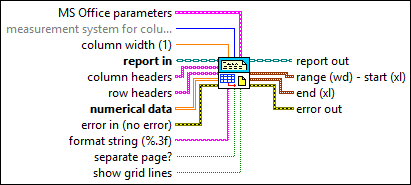
Appends a 2D array to a report as a table with the given column width. Wire data to the text data input to determine the polymorphic instance to use or manually select the instance.
Inputs/Outputs
 MS Office parameters
—
MS Office parameters
—
MS Office parameters (Report Generation Toolkit) specifies the point in a Microsoft Word or Excel report where you want an insertion to occur. The VI ignores this input for HTML reports. You can specify a bookmark in Word or a named range or cell coordinates in Excel. If you set the report type to Word but do not specify a bookmark, the insertion occurs at the end of the document.
 measurement system for column width (Default)
—
measurement system for column width (Default)
—
measurement system for column width determines whether the value you enter in column width is in inches or centimeters. The VI ignores this parameter for HTML reports.
 column width (1)
—
column width (1)
—
column width defines the width of each column in the report table.
The value you enter must be in inches or centimeters, depending on the settings you enter in measurement system for column width. The default is 1. For HTML reports, the VI multiplies the value by 100 to set the column width in pixels.
Note If you set column width to a large value and send several columns of data to the VI, the VI automatically resizes the column width to fit the width of the report on a single page. If you are using a template and do not want the column width to vary, use the value -1.
 report in
—
report in
—
report in is a reference to the report whose appearance, data, and printing you want to control. Use the Create Report VI to generate this LabVIEW class object.  column headers
—
column headers
—
column headers determines how each column is labeled in the table.
row headers
—
row headers determines how each row is labeled in the table.  numerical data
—
numerical data
—
numerical data is the numerical information included in the table. The information must be a 2D array.  error in (no error)
—
error in (no error)
—
error in describes error conditions that occur before this node runs. This input provides standard error in functionality.  format string (%.3f)
—
format string (%.3f)
—
format string specifies the number formatting to use when converting the numbers to characters. The default is %.3f. Use the format string syntax.  separate page?
—
separate page?
—
separate page? specifies whether to place the table on a new page of the report. The default is FALSE.
show grid lines
—
show grid lines specifies whether to display the grid lines of the table. The default is TRUE.  report out
—
report out
—
report out is a reference to the report whose appearance, data, and printing you want to control. You can wire this output to other Report Generation VIs.  range (wd) - start (xl)
—
range (wd) - start (xl)
—
range (wd) - start (xl) (Report Generation Toolkit) indicates the place where the VI inserts the table.
end (xl)
—
end (xl) (Report Generation Toolkit) indicates the last cell in the Excel worksheet where the VI inserts the table.
 error out
—
error out
—
error out contains error information. This output provides standard error out functionality. |
 position (excel)
—
position (excel)
—
 row
—
row
—
 start (wd) - row (xl)
—
start (wd) - row (xl)
—
Examples
Refer to the following example files included with LabVIEW.
- labview\examples\reports\TextReportExample.llb\Text Report Example.vi