Append List to Report VI
- Updated2025-07-30
- 3 minute(s) read
Adds a list of elements to the report.
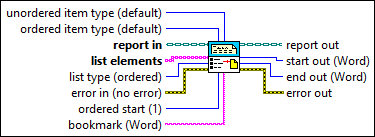
Inputs/Outputs
 unordered item type (default)
—
unordered item type (default)
—
unordered item type determines the symbol used to denote a list item in an unordered list. You can specify a symbol only if the report is HTML-based. The default for HTML-based reports is a bullet.
ordered item type (default)
—
ordered item type determines how the ordered list appears, numerical or alphabetical. The default is arabic numerals.
 report in
—
report in
—
report in is a reference to the report whose appearance, data, and printing you want to control. Use the Create Report VI to generate this LabVIEW class object.  list elements
—
list elements
—
list elements are the items you want to include in the list.
list type (ordered)
—
list type specifies whether the list appears ordered or unordered in the report.
 error in (no error)
—
error in (no error)
—
error in describes error conditions that occur before this node runs. This input provides standard error in functionality.  ordered start (1)
—
ordered start (1)
—
ordered start determines the number or letter the list starts with. Enter the number or the letter that corresponds to the number with which you want to start. For example, A equals 1, B equals 2, or a equals 1, b equals 2. The default is 1.  bookmark (Word)
—
bookmark (Word)
—
bookmark (Report Generation Toolkit) contains the name of the bookmark in a Microsoft Word document from which the insertion occurs. The VI ignores this input for HTML reports.  report out
—
report out
—
report out is a reference to the report whose appearance, data, and printing you want to control. You can wire this output to other Report Generation VIs.  start out (Word)
—
start out (Word)
—
start out (Report Generation Toolkit) represents the index of the character at the beginning of the text inserted in the Microsoft Word document. The VI ignores this input for HTML reports.
end out (Word)
—
end out (Report Generation Toolkit) represents the index of the character at the end of the text inserted in the Microsoft Word document. The VI ignores this input for HTML reports.  error out
—
error out
—
error out contains error information. This output provides standard error out functionality. |