Append Image to Report (string wrap) VI
- Updated2025-07-30
- 4 minute(s) read
For an HTML report, the VI embeds a link to an image into the report.
You can wire either a path to the image or a string that contains the image URL to this polymorphic VI. Wire data to the path or URL of image input to determine the polymorphic instance to use or manually select the instance.
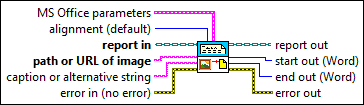
Inputs/Outputs
 MS Office parameters
—
MS Office parameters
—
MS Office parameters (Report Generation Toolkit) specifies the point in a Microsoft Word or Excel report where you want an insertion to occur. The VI ignores this input for HTML reports. You can specify a bookmark in Word or a named range or cell coordinates in Excel. If you set the report type to Word but do not specify a bookmark, the insertion occurs at the end of the document.
 alignment (default)
—
alignment (default)
—
alignment sets the alignment of the image in a report. (Report Generation Toolkit) For Microsoft Word reports, you can use only the LEFT, RIGHT, and MIDDLE options.
 report in
—
report in
—
report in is a reference to the report whose appearance, data, and printing you want to control. Use the Create Report VI to generate this LabVIEW class object.  path or URL of image
—
path or URL of image
—
path or URL of image designates the URL of the linked image. If you intend to post this page to the World Wide Web, use forward slashes (/) in paths. If the images are on your local computer or on a network, use backslashes (\) in the paths. If you move the images, you must update the links.
caption or alternative string
—
caption or alternative string is the text to display instead of the image if you view the report in a Web browser set to display only text.  error in (no error)
—
error in (no error)
—
error in describes error conditions that occur before this node runs. This input provides standard error in functionality.  report out
—
report out
—
report out is a reference to the report whose appearance, data, and printing you want to control. You can wire this output to other Report Generation VIs.  start out (Word)
—
start out (Word)
—
start out (Report Generation Toolkit) represents the index of the character at the beginning of the text inserted in the Microsoft Word document. The VI ignores this input for HTML reports.
end out (Word)
—
end out (Report Generation Toolkit) represents the index of the character at the end of the text inserted in the Microsoft Word document. The VI ignores this input for HTML reports.  error out
—
error out
—
error out contains error information. This output provides standard error out functionality. |
 position (Excel)
—
position (Excel)
—
 row
—
row
—