mouseAcquire VI
- Updated2025-07-30
- 3 minute(s) read
Returns data about the device connected to the computer. Wire data to the device ID input to determine the polymorphic instance to use or manually select the instance.
(Windows) You must have DirectX 8.0 or later to use this VI.
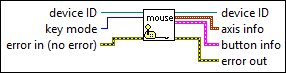
Inputs/Outputs
 device ID
—
device ID
—
device ID identifies which device you acquired data from.  key mode
—
key mode
—
key mode determines the key mode to use.
 error in (no error)
—
error in (no error)
—
error in describes error conditions that occur before this node runs. This input provides standard error in functionality.  device ID
—
device ID
—
device ID identifies which device to acquire data from.  axis info
—
axis info
—
axis info contains the numeric value for axes.
 button info
—
button info
—
 error out
—
error out
—
error out contains error information. This output provides standard error out functionality. |
 Horizontal
—
Horizontal
—
 button 1
—
button 1
—
Examples
Refer to the following example files included with LabVIEW.
- labview\examples\Connectivity\Input Device Control\Monitoring Keyboard and Mouse Activity.vi