Write Key (I32) VI
- Updated2025-07-30
- 3 minute(s) read
Writes a value to a key in a specified section of the configuration data identified by refnum. This VI modifies data in memory. To write data to disk, use the Close Config Data VI. Wire data to the value input to determine the polymorphic instance to use or manually select the instance.
Format the content of an .ini file correctly when you use this VI.
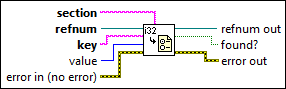
Inputs/Outputs
 section
—
section
—
section is the name of the section in which to write the specified key.  refnum
—
refnum
—
refnum is the reference number of the configuration data.
key
—
key is the name of the key to write.  value
—
value
—
value is the value of the key to write.  error in (no error)
—
error in (no error)
—
error in describes error conditions that occur before this node runs. This input provides standard error in functionality.  refnum out
—
refnum out
—
refnum out is the reference number of the configuration data.  found?
—
found?
—
found? is TRUE if the VI found the key in the specified section.  error out
—
error out
—
error out contains error information. This output provides standard error out functionality. |
If key exists, the VI replaces the existing value. If key does not exist, the VI adds the key/value pair to the end of the specified section. If section does not exist, the VI adds section, with the key/value pair, to the end of the configuration data.
Examples
Refer to the following example files included with LabVIEW.
- labview\examples\File IO\Configuration (INI)\Configuration (INI) File.lvproj