Open Anaconda Python Session VI
- Updated2026-07-27
- 2 minute(s) read
Opens a Python session with a specific version of Python in an Anaconda virtual environment. If Anaconda is not installed in the default location or there are multiple installations of Anaconda on the system, use the Anaconda Path input to specify the installation of Anaconda to use for the session.
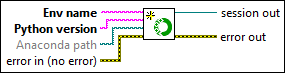
Inputs/Outputs
 Env name
—
Env name
—
Env name specifies the name of Anaconda virtual environment.
Python version
—
Python version specifies the version of Python in which the Python session runs. This function supports the following Python versions:
Although unsupported versions might work with the LabVIEW Python functions, NI recommends using supported versions of Python only.  Anaconda path
—
Anaconda path
—
Anaconda path specifies the directory where Anaconda is installed.  error in (no error)
—
error in (no error)
—
error in can accept error information wired from VIs previously called. Use this information to decide if any functionality should be bypassed in the event of errors from other VIs. Right-click the error in control on the front panel and select Explain Error or Explain Warning from the shortcut menu for more information about the error.  session out
—
session out
—
session out returns a reference to the Python session.  error out
—
error out
—
error out contains error information. With the following exception, this output provides standard error out functionality. If the value of error in is no error, this VI contains error information that corresponds to the error code input. |