List DataPlugins VI
- Updated2026-02-04
- 3 minute(s) read
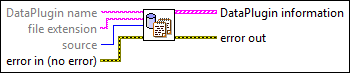
Lists all DataPlugins existing on the National Instruments website at ni.com/dataplugins or registered on the local computer. You also can use this VI to search for a DataPlugin that exists on the local computer or the National Instruments website.
Inputs/Outputs
 DataPlugin name
—
DataPlugin name
—
DataPlugin name specifies the name of the DataPlugin you want to search for. If you do not wire data to this input or if you wire an empty string to this input, this VI lists all DataPlugins registered on the local computer or exist on the National Instruments website.
file extension
—
file extension specifies the file extension of a DataPlugin.  source
—
source
—
source specifies the source location where you want to search for the DataPlugins.
 error in (no error)
—
error in (no error)
—
error in describes error conditions that occur before this node runs. This input provides standard error in functionality.  DataPlugin information
—
DataPlugin information
—
DataPlugin information returns information about each DataPlugin.
 error out
—
error out
—
error out contains error information. This output provides standard error out functionality. |
 name
—
name
—
 read-only?
—
read-only?
—
 extensions
—
extensions
—
Examples
Refer to the following example files included with LabVIEW.
- labview\examples\File IO\DataPlugins\General\Manage DataPlugins.vi