Create Query Expression (Time Stamp) VI
- Updated2025-07-30
- 2 minute(s) read
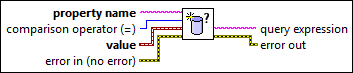
Creates a query expression to use with the Execute Query Expression VI to search for objects that meet the condition you specify. Wire data to the value input to determine the polymorphic instance to use or manually select the instance.
Inputs/Outputs
 property name
—
property name
—
property name specifies the name of the property. Use the Get Property Info VI to obtain the property name.  comparison operator (=)
—
comparison operator (=)
—
comparison operator (=) specifies the comparison condition.
 value
—
value
—
value specifies the value you want to compare.  error in (no error)
—
error in (no error)
—
error in describes error conditions that occur before this node runs. This input provides standard error in functionality.  query expression
—
query expression
—
query expression returns a query expression based on what you wired to the inputs.  error out
—
error out
—
error out contains error information. This output provides standard error out functionality. |