Property Node (ActiveX)
- Updated2026-07-27
- 2 minute(s) read
Gets (reads) and/or sets (writes) properties of a reference.
The Property Node (ActiveX) is preconfigured to access ActiveX properties. The node operates in the same way as a standard Property Node.
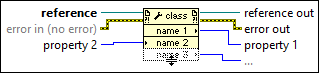
Inputs/Outputs
 reference
—
reference
—
reference is the refnum associated with the ActiveX object for which you want to set or get properties.
 error in (no error)
—
error in (no error)
—
error in describes error conditions that occur before this node runs. This input provides standard error in functionality.
 reference out
—
reference out
—
reference out returns reference unchanged.
 error out
—
error out
—
error out contains error information. This output provides standard error out functionality.
 Property
—
Property
—
property 1..n are examples of properties you want to get (read).
|
If the property you want to write is variant, you can wire LabVIEW data and it automatically converts to variant data indicated by a coercion dot. ActiveX does not support 64-bit integer data types. If you wire 64-bit integer data to a variant parameter of an ActiveX Property Node, LabVIEW converts the data to a double-precision, floating-point number. If the property is variant, use the Variant To Data function to convert to LabVIEW data, if needed. If you right-click the Property Node and select Select Class»ActiveX»Browse from the shortcut menu, LabVIEW displays the Select Object From Type Library dialog box.
On the front panel or block diagram, right-click an ActiveX object, select Create»Property Node, and select a property from the shortcut menu to set a property for the object. You also can select ActiveX-specific properties for an ActiveX object. On the block diagram, right-click an ActiveX object, select Create»Property Node, and select an ActiveX-specific property from the shortcut menu.