Axes Properties
- Updated2025-07-30
- 3 minute(s) read
Adjusts the properties of the x-, y-, and z-axes, including scaling and inverting.
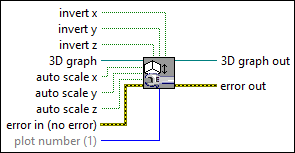
Inputs/Outputs
 invert x
—
invert x
—
invert x reverses the plot along the x plane.
invert y
—
invert y reverses the plot along the y plane.
invert z
—
invert z reverses the plot along the z plane.  3D graph
—
3D graph
—
3D graph accepts the reference to the 3D control.
auto scale x
—
auto scale x enables autoscaling for the x plane.
auto scale y
—
auto scale y enables autoscaling for the y plane.
auto scale z
—
auto scale z enables autoscaling for the z plane.  error in (no error)
—
error in (no error)
—
error in describes error conditions that occur before this node runs. This input provides standard error in functionality.  plot number (1)
—
plot number (1)
—
plot number is the index into the list of plots from the properties of the 3D control. Add new plots by right-clicking the control and adjusting the properties. The default is the first plot from the list.  3D graph out
—
3D graph out
—
3D graph out passes the reference to the 3D control out so that you can use it with other VIs.  error out
—
error out
—
error out contains error information. This output provides standard error out functionality. |