Takes a picture and an array of plots and appends a picture that represents the radar plot of the data.

You can use a radar plot to compare the performance of one set of data with another set of data. This VI uses the Draw Legend VI as a subVI.
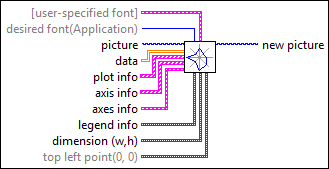

icon

Inputs/Outputs

  • ccclst.png [user-specified font]

    [user-specified font] specifies the specific font characteristics for the text to draw.

    The VI ignores this input unless desired font is User-specified Font.

  • cstr.png Font Name:

    Font Name specifies the font to use for the text.

    If you misspell the font name or specify a font that is not installed on the computer, the operating system selects a font.

  • ci16.png Size

    Size specifies the size of the font in points.

  • cbool.png Strikeout?

    Strikeout? specifies if the text appears in strikeout. If Strikeout? is TRUE, the text appears in strikeout.

  • cbool.png Italic?

    Italic? specifies if the text appears in italics. If Italic? is TRUE, the text appears in italics.

  • cbool.png Underline?

    Underline? specifies if the text is underlined. If Underline? is TRUE, the text appears underlined.

  • cbool.png Outline?

    Outline? specifies if the text is outlined. If Outline? is TRUE, the text appears outlined.

  • cbool.png Shadow?

    Shadow? specifies if the text has a shadow. If Shadow? is TRUE, the text appears in shadow.

  • cbool.png Bold?

    Bold? specifies if the text is bold. If Bold? is TRUE, the text appears bold.

  • cenum.png desired font(Application)

    desired font specifies the text font.

    0
    User-specified Font
    1
    Application Font
    (default)
    2
    System Font
    3
    Dialog Font
  • cpict.png picture

    picture is the picture to which you want to add the plot. The default is an empty picture.

  • c2ddbl.png data

    data is a 2D array, where each row represents a plot.

    The VI draws each index in a plot on a corresponding y-scale. A straight line connects all the points in a plot.

  • c1dcclst.png plot info

    plot info specifies the name, color, and fill option for each plot.

    The index of this array matches the row index in data.

    The VI uses plot name and plot color for the legend.

  • cstr.png plot name

    plot name is the name of the plot.

  • cu32.png plot color (white)

    plot color is the color of the plot.

    The default in RGB is white.

    You can wire a color box constant to this input.

  • cbool.png fill?(F)

    fill? specifies whether to fill the interior.

    If FALSE (default), the VI draws only the outlines.

  • c1dcclst.png axis info

    axis info specifies the label (name) of each y-axis and the minimum and maximum value of each y-axis.

    The index of this array matches the column index in data.

  • cstr.png label

    label is the label of the y-axis.

  • cdbl.png max value

    max value is the maximum value of the y-axis.

  • cdbl.png min value

    min value is the minimum value of the y-axis.

  • ccclst.png axes info

    axes info specifies the color, format and precision of the y-axes, and whether to autoscale the y-axes.

  • cu32.png color (white)

    color is the color for all the y-axes.

    The default in RGB is 255, 255, 255.

    You can wire a color box constant to this input.

  • cnclst.png format and precision

    format and precision specifies the format of the values on the y-axes.

  • cenum.png format

    format specifies the numeric format for the scale numbers.

    0
    Decimal
    1
    Scientific
    2
    Engineering
    3
    Binary
    4
    Octal
    5
    Hex
  • cu8.png precision

    precision specifies the precision for the scale numbers. The default is 1.

  • cbool.png autoscale? (false)

    autoscale? specifies whether to autoscale each y-axis independently.

    If FALSE (default), the VI does not autoscale each y-axis.

  • cnclst.png legend info

    legend info specifies the location of the plot legend relative to the radar plot.

  • cenum.png position (none)

    position specifies where to draw the legend.

    0None (default)—The VI does not draw the legend.
    1
    Top
    2
    Right
    3
    Bottom
    4
    Left
  • cu32.png text color(white)

    text color is the color of the labels of the y-axes, as shown in the legend.

    The default in RGB is 255, 255, 255.

    You can wire a color box constant to this input.

  • cnclst.png dimension (w,h)

    dimension (w,h) specifies the rectangle in coordinates into which the VI draws the radar plot and legend.

  • cu32.png Width

    Width is the horizontal coordinate that increases to the right.

  • cu32.png Height

    Height is the vertical coordinate that increases to the bottom.

  • cnclst.png top left point(0, 0)

    top left point specifies in coordinates where to place the top-left corner of the image in the new picture.

  • ci16.png x

    x is the horizontal coordinate that increases to the right.

  • ci16.png y

    y is the vertical coordinate that increases to the bottom.

  • ipict.png new picture

    new picture is the picture that contains the plot. You can wire this output to any other picture input to add more drawing instructions to the picture.

    You also can wire this output to the Picture to Pixmap VI to obtain an image data cluster. You then can save the image data to a file using the Graphics Formats VIs.

  • Examples

    Refer to the following example files included with LabVIEW.

    • labview\examples\Graphics and Sound\Picture Plots\Simple Radar Plot.vi