Accepts a periodic waveform or an array of periodic waveforms and returns the period, pulse duration (pulse width), duty cycle (duty factor), and pulse center of a selected pulse and period. Wire data to the signal in input to determine the polymorphic instance to use or manually select the instance.

Note The terminology and measurement definitions for this VI comply with IEEE Standard 181-2003, IEEE Standard on Transitions, Pulses, and Related Waveforms.


icon

Inputs/Outputs

  • cu16.png export mode

    export mode specifies whether this VI returns the period or duty cycle outputs.

    0all (default)–Returns period, pulse duration, duty cycle, and measurement info.
    1no period and duty cycle–Returns pulse duration and measurement info but does not return period or duty cycle.
  • ci32.png pulse number (1)

    pulse number specifies which pulse of polarity, high or low, LabVIEW measures.

    For pulse number n with polarity low, the VI measures the pulse duration and center of the nth low pulse. The VI measures the period and duty cycle of the period that begins with the (2n – 1)th mid ref level crossing.

  • cmsdt.png signal in

    signal in is the waveform to measure. The waveform must contain at least pulse number complete cycles, where a cycle is the interval between two consecutive mid ref level crossings in the same direction.

  • cu16.png polarity (high)

    polarity defines a pulse as high (default) or low. A high pulse consists of the interval between a rising mid ref level crossing and the next falling mid ref level crossing.

  • cnclst.png reference levels

    reference levels specifies the high, middle, and low reference levels of a waveform.

    LabVIEW uses the reference levels to define the measurement interval of one complete cycle. The distance between the mid ref level and the high ref level must equal the distance between the low ref level and the mid ref level. If the two distances are not equal, LabVIEW adjusts either the high ref level or the low ref level to match the smaller of the two distances. For example, if you specify a high ref level of 90%, a mid ref level of 50%, and a low ref level of 20%, LabVIEW uses 80% instead of 90% for the high ref level.

  • cdbl.png high ref level

    high ref level specifies the high reference level of the waveform in percent (default) or absolute units.

    After the signal crosses the mid ref level in the rising direction, it must cross the high ref level before the next falling mid ref level crossing can be counted.

  • cdbl.png mid ref level

    mid ref level specifies the middle reference level in percent (default) or absolute units.

    The interval between consecutive rising mid ref level crossings defines one cycle, or period, of the waveform. At least one high/low reference level crossing must separate each mid ref level crossing.

  • cdbl.png low ref level

    low ref level specifies the low reference level of the waveform in percent (default) or absolute units.

    After the signal crosses the mid ref level in the falling direction, it must cross the low ref level before the next rising mid ref level crossing can be counted.

  • cu16.png ref units

    ref units specifies whether the high ref level, mid ref level, and low ref level inputs are interpreted as a percentage (default) of the full range of the waveform or as absolute levels.

  • cerrcodeclst.png error in (no error)

    error in describes error conditions that occur before this node runs. This input provides standard error in functionality.

  • cnclst.png percent level settings

    percent level settings specifies the method LabVIEW uses to determine the high and low state levels of a waveform.

    If you select percent ref units, percent level settings determines the reference levels. Otherwise, LabVIEW ignores this input.

  • cenum.png method

    method specifies how LabVIEW computes the high and low state levels of the waveform.

    0Histogram—Returns the levels of the histogram bins with the maximum number of hits in the upper and lower regions of the waveform. The upper and lower regions of the waveform include the upper and lower 40%, respectively, of the peak-to-peak range of the waveform.
    1Peak—Searches the entire waveform for its maximum and minimum levels.
    2Auto select (default)—Determines whether the histogram bins that correspond to the high and low state levels each have over 5% of the total hits. If so, LabVIEW returns those results. Otherwise, LabVIEW uses the peak method. This ensures a reasonable answer for either a square wave (ignoring the overshoot and undershoot) or a triangle wave (where a histogram fails).
  • ci32.png histogram size

    histogram size specifies the number of bins in the histogram LabVIEW uses to determine the high and low state levels of the waveform.

  • cenum.png histogram method

    histogram method specifies how LabVIEW computes the high and low state levels of the waveform. Currently, mode is the only available histogram method.

    0
    mode
  • cdbl.png reserved

    reserved is reserved for future use.

  • idbl.png period

    period returns the time between adjacent mid ref level crossings in the same direction in seconds.

    The reciprocal of this value is the signal frequency. The measurement interval includes the pulse you specify in pulse number.

  • idbl.png pulse duration

    pulse duration is the time difference in seconds between the first two mid ref level crossings of the pulse number. pulse duration is also known as pulse width.

  • idbl.png duty cycle

    duty cycle is a fraction of a period.

    duty cycle is also known as duty factor. LabVIEW uses the following equation to calculate duty cycle: In this equation, pulse duration can refer to the high or low portion of the period, depending on whether polarity is high pulse or low pulse.

  • ierrcodeclst.png error out

    error out contains error information. This output provides standard error out functionality.

  • icclst.png measurement info

    measurement info returns the pulse-center time of the selected pulse and the absolute reference levels LabVIEW uses to define the measurement cycle.

  • idbl.png pulse center

    pulse center specifies the time instant of the midpoint of the pulse number.

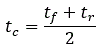
    pulse center for a polarity of high pulse is given by the following equation: where tc is the pulse center time, tf is the time instant of the falling mid ref level crossing, and tr is the time instant of the preceding rising mid ref level crossing.

  • inclst.png ref levels

    ref levels returns the three user-defined reference levels of the waveform in absolute units.

    LabVIEW uses the reference levels to define the interval of one cycle measurement.

  • idbl.png high ref level

    high ref level returns the high reference level.

  • idbl.png mid ref level

    mid ref level returns the middle reference level.

  • idbl.png low ref level

    low ref level returns the low reference level.

  • iu16.png ref units

    ref units is always absolute in measurement info.

  • Examples

    Refer to the following example files included with LabVIEW.

    • labview\examples\Signal Processing\Waveform Measurements\Pulse and Transition Measurements.vi
    • labview\examples\Signal Processing\Waveform Measurements\N channel Pulse and Transition Measurements.vi