Create Segmented Mask VI
- Updated2025-07-30
- 3 minute(s) read
Creates continuous or segmented masks in the time domain or in the frequency domain. You can use different instances of this VI to create multiple limits. Wire data to the Specification Cluster input to determine the polymorphic instance to use or manually select the instance.

Inputs/Outputs
 Reset
—
Reset
—
Reset indicates if the VI computes Limit. If TRUE, the VI computes Limit using the values in the Specification Cluster. If FALSE (default), the VI does not compute Limit. The VI always computes Limit the first time LabVIEW runs this VI.  Specification Cluster
—
Specification Cluster
—
Specification Cluster is an array of clusters that contains the x-axis and y-axis values at which the limit is specified. The ith element in the array defines the ith segment in the segmented mask.
 dx
—
dx
—
dx is the x-axis interval between points in the input data to compare against the limits. The VI uses this value to interpolate the y-axis data for the limit.
x0
—
x0 is the starting x-axis value of the input data to compare against the limits. The limit is undefined for values of x that are smaller than the first element in the input array X.  error in (no error)
—
error in (no error)
—
error in describes error conditions that occur before this node runs. This input provides standard error in functionality.  Limit
—
Limit
—
Limit contains a segmented mask, as defined by Specification Cluster, dx, and x0.
 error out
—
error out
—
error out contains error information. This output provides standard error out functionality. |
 X
—
X
—
 x0
—
x0
—
 Y
—
Y
—
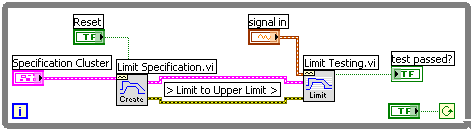
You specify the y-axis values in terms of numeric values and use this VI with the Limit Testing VI to do limit testing. Wire the Limit Specification VI and the Limit Testing VI in either a For Loop or a While Loop. Set Reset to FALSE, unless you want to change the limit. The following illustration shows the Limit Specification VI and the Limit Testing VI wired together in a While Loop.