Define 1D Heat PDE IC (Numeric) VI
- Updated2025-07-30
- 2 minute(s) read
Defines the initial condition of a partial differential equation. You must manually select the polymorphic instance to use.

Inputs/Outputs
 PDE in
—
PDE in
—
PDE in is the class that stores the data of the equation.  Initial Condition
—
Initial Condition
—
Initial Condition specifies the value of the initial condition. The length of Initial Condition must be # of x-points from the Define PDE Domain VI. Initial Condition stores the values of the unknown function evaluated on points X at initial t from the Define PDE Domain VI. By default, LabVIEW assumes that its values are zeros.  error in (no error)
—
error in (no error)
—
error in describes error conditions that occur before this node runs. This input provides standard error in functionality.  PDE out
—
PDE out
—
PDE out returns PDE in with the initial condition.  error out
—
error out
—
error out contains error information. This output provides standard error out functionality. |
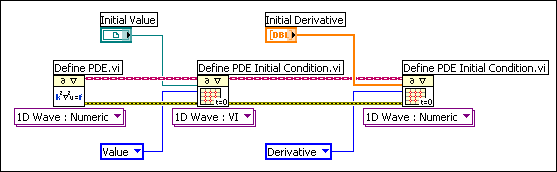
The heat equation requires only the initial value to solve the equation. However, for the wave equation, specify the value and the derivative value with respect to the time variable at initial time. The following block diagram is an example of how to define the initial condition for a one-dimensional wave equation. The VI defines the initial value, and the numeric array defines the initial derivative.
Examples
Refer to the following example files included with LabVIEW.
- labview\examples\Mathematics\Differential Equations - PDE\PDE String Vibration.vi
- labview\examples\Mathematics\Differential Equations - PDE\PDE Thermal Distribution.vi