Eval Formula Node VI
- Updated2026-07-27
- 3 minute(s) read
Requires: Full or Professional Edition
Similar to the Formula Node but with variables that can be entered on the front panel. Refer to Formula Parsing VIs in More Detail for more information on the differences between the Eval Formula Node VI and the Formula Node.
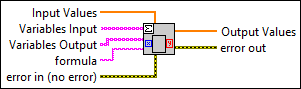
Inputs/Outputs
 Input Values
—
Input Values
—
Input Values is an array of numbers with a one-to-one relation to Variables Input.  Variables Input
—
Variables Input
—
Variables Input is an array of input strings, each of which represents a valid variable name.
Variables Output
—
Variables Output is an array of output strings, each of which represents a valid variable name.  formula
—
formula
—
formula is a string consisting of one or more formulas separated by semicolons. Each formula is built up by Variables Input on the right side of an equation and Variables Output on the left side. The formulas can contain any number of valid variables.  error in (no error)
—
error in (no error)
—
error in describes error conditions that occur before this node runs. This input provides standard error in functionality.  Output Values
—
Output Values
—
Output Values is a 1D array of numbers corresponding to Variables Output and formula. The numbers in Output Values represent the results.  error out
—
error out
—
error out contains error information. This output provides standard error out functionality. |
The following inputs:
- formula: y = 3*x + 4*z; p = q^2 - 5;
- Variables Input: [x, z, q]
- Input Values: [1,2,3]
- Variables Output: [y, p]
result in Output Values [11.00, 4.00].