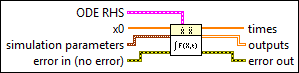
Solves ordinary differential equations with initial conditions of the following form: X'=F(X,t). You must manually select the polymorphic instance to use.

icon

Inputs/Outputs

  • ccclst.png ODE RHS

    ODE RHS is a cluster of formula strings and variable strings that implements the right-hand-side of an ordinary differential equation X'=F(X,t).

  • c1dstr.png F(X,t)

    F(X,t) is a 1D array of strings representing the right sides of the differential equations. The formulas can contain any number of valid variables.

  • c1dstr.png X

    X is an array of strings of variables. When naming these variables, you must use either one character only or one character and one number.

  • cstr.png time

    time is the string denoting the time variable. The default variable is t.

  • c1ddbl.png x0

    x0 is the vector of initial values of the ODE states.

  • cnclst.png simulation parameters

    simulation parameters specifies the set of parameters used to configure the numerical solution of the differential equation.

  • cdbl.png Initial Time

    Initial Time specifies the time at which to start the ordinary differential equation (ODE) solver. The default is 0.

  • cdbl.png Final Time

    Final Time is the time at which the ODE solver stops.

  • cdbl.png Time Step

    Time Step is the interval between the times at which the ODE solver evaluates the model and updates the model output, in seconds. LabVIEW uses this parameter only if you select a fixed step-size ODE solver.

  • cdbl.png Absolute Tolerance

    Absolute Tolerance specifies the absolute tolerance the ODE solver uses to control the error.

    For y' = f(y), the ODE solver maintains error ≈ |y| * relative tolerance + absolute tolerance.

    LabVIEW uses this parameter only if you select a variable step-size solver. Variable step-size solvers use this error to adjust the step size. If the error is too large, the variable step-size solver reduces the step size. If the error is too small, the variable step-size solver increases the step size. Absolute tolerance is most significant when y is small.

  • cdbl.png Relative Tolerance

    Relative Tolerance specifies the relative tolerance the ODE solver uses to control the error.

    For y' = f(y), the ODE solver maintains error ≈ |y| * relative tolerance + absolute tolerance.

    LabVIEW uses this parameter only if you select a variable step-size solver. Variable step-size solvers use this error to adjust the step size. If the error is too large, the variable step-size solver reduces the step size. If the error is too small, the variable step-size solver increases the step size. Relative tolerance is most significant when y is large.

  • cenum.png Continuous Solver

    Continuous Solver is the type of ODE solver used to evaluate the simulation diagram. The default is Runge-Kutta 45 (variable).

    0
    Runge-Kutta 1 (Euler)
    1
    Runge-Kutta 2
    2
    Runge-Kutta 3
    3
    Runge-Kutta 4
    4
    Runge-Kutta 23 (variable)
    5
    Runge-Kutta 45 (variable)
    6
    BDF (variable)
    7
    Adams-Moulton (variable)
    8
    Rosenbrock (variable)
    9
    Discrete States Only
  • cdbl.png Discrete Time Step

    Discrete Time Step specifies the base time step to use for discrete functions, in seconds. The ODE solver might not evaluate a discrete function every Discrete Time Step. The ODE solver evaluates the discrete function and updates the function output every n discrete time steps, where n is the sample rate divisor parameter you specify for that function.

    Note If you select a fixed step-size solver, the Discrete Time Step must be an integer multiple of the Time Step. If you specify a Discrete Time Step that is not an integer multiple of the Time Step, LabVIEW displays a run-time error when you attempt to run the simulation.
  • cdbl.png Minimum Time Step

    Minimum Time Step specifies the smallest time step size the ODE solver can use to evaluate the simulation diagram. LabVIEW uses this parameter only if you select a variable step-size solver.

  • cdbl.png Maximum Time Step

    Maximum Time Step specifies the largest time step size the ODE solver can use to evaluate the simulation diagram. LabVIEW uses this parameter only if you select a variable step-size solver.

  • cdbl.png Initial Time Step

    Initial Time Step specifies the time step size for the first time step of the simulation diagram evaluation. LabVIEW uses this parameter only if you select a variable step-size solver.

  • cerrcodeclst.png error in (no error)

    error in describes error conditions that occur before this node runs. This input provides standard error in functionality.

  • i1ddbl.png times

    times is the array of points in time at which the differential equation solver stepped or was evaluated. If you select a fixed step-size solver, then times contains evenly spaced values.

  • i2ddbl.png outputs

    outputs is a two-dimensional array of y values. Each row corresponds to the vector of y-values evaluated at a particular time. Each column is history of a particular y-value over time.

  • ierrcodeclst.png error out

    error out contains error information. This output provides standard error out functionality.