FTP Put Buffer VI
- Updated2025-07-30
- 3 minute(s) read
Connects to an FTP server and stores the contents of a single buffer.
(NI Linux Real-Time) The FTP server is disabled by default, and you cannot use it in safe mode. National Instruments recommends using WebDAV as the file transfer mechanism for improved security.
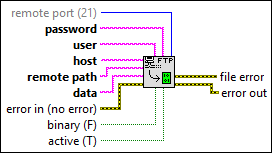
Inputs/Outputs
 remote port (21)
—
remote port (21)
—
remote port is the TCP/IP port at which the server listens. The default is 21, the FTP control port.  password
—
password
—
password is the password that authenticates the username. (NI Linux Real-Time) You must specify a blank password. For NI Linux Real-Time targets, the FTP server does not accept NI-Auth credentials.
user
—
user is the name you want to use to log on to the FTP server. The default is anonymous. (NI Linux Real-Time) You must specify anonymous as the value for this input. For NI Linux Real-Time targets, the FTP server does not accept NI-Auth credentials.
host
—
host is the name or IP address of an FTP server.
remote path
—
remote path is a path to a file on the FTP server. The remote path input supports Windows-like file paths such as c:\ni-rt\system\a.txt and UNIX-like file paths such as /ni-rt/system/a.txt. If you need to specify a drive letter on UNIX-like paths, the input supports paths such as /c:/ni-rt/system/a.txt.
data
—
data is the data to be stored.  error in (no error)
—
error in (no error)
—
error in describes error conditions that occur before this node runs. This input provides standard error in functionality.  binary (F)
—
binary (F)
—
binary specifies whether to transfer data in binary or ASCII mode. The default is FALSE, in which the VI transfers data in ASCII mode.
active (T)
—
active specifies whether the data connection is active or passive. The default is TRUE, which specifies an active connection.  file error
—
file error
—
file error lists any file-related errors, such as invalid remote path or file access permission denied.
error out
—
error out contains error information. This output provides standard error out functionality. |