Check for Included Angle (array) VI
- Updated2025-07-30
- 4 minute(s) read
Checks whether one or multiple input angles are within the counterclockwise range.
Wire data to any of the angle inputs to determine the polymorphic instance to use or manually select the instance.
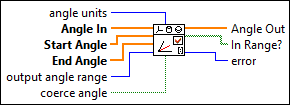
Inputs/Outputs
 angle units
—
angle units
—
angle units specifies the units of the input and output angles of the VI.
 Angle In
—
Angle In
—
Angle In specifies a set of input angles the VI checks. The elements in Angle In correspond to the elements in Start Angle and End Angle.
Start Angle
—
Start Angle specifies the set of angles at the beginning of the ranges. The ranges continue in the counterclockwise direction.
End Angle
—
End Angle specifies the set of angles at the end of the ranges. The elements in End Angle must have the same units as the elements in Start Angle. Angle In, Start Angle, and End Angle must have the same number of elements or the VI returns error code –20002.  output angle range
—
output angle range
—
output angle range specifies the range of the output angle. When the angle exceeds one side of the range, the angle continues on the opposite side of the range.
 coerce angle
—
coerce angle
—
coerce angle determines whether angle out is in the range when angle in is not in range. If FALSE, angle out returns the same value as angle in. If TRUE, angle out returns the value of the angle that is nearest to the beginning or end of the range. coerce angle does not do anything when angle in is in the range.  Angle Out
—
Angle Out
—
Angle Out returns the elements in Angle In if coerce angle is FALSE. If coerce angle is TRUE and corresponding elements of Angle In are between the ranges of Start Angle and End Angle, Angle Out also returns Angle In. If coerce angle is TRUE and the corresponding elements of Angle In are out of range, the VI coerces the elements of Angle Out to the nearest angle of each range.  In Range?
—
In Range?
—
In Range? returns whether Angle In is within the range between Start Angle and End Angle.  error
—
error
—
error returns any error or warning from the VI. You can wire error to the Error Cluster From Error Code VI to convert the error code or warning into an error cluster. |
The following image shows an example of the input angle within the range from the start angle to the end angle.

The following image shows an example of the input angle out of the range from the start angle to the end angle.

If you use this VI to check whether a range includes the angle in the previous image, the VI coerces angle out to start angle if coerce angle is TRUE.