PID Autotuning (Temperature) VI
- Updated2025-07-30
- 7 minute(s) read
Directly controls and tunes a system. You can use this VI to improve performance of not only temperature systems, but also other types of systems that contain dead time. This VI uses internal model control to compensate for dead time and tune the system.
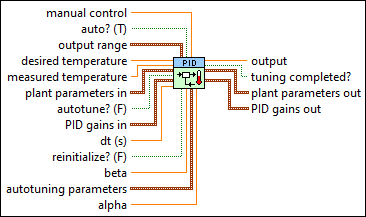
Inputs/Outputs
 manual control
—
manual control
—
manual control specifies the value of the control output when auto? is FALSE.  auto? (T)
—
auto? (T)
—
auto? specifies whether to use automatic or manual control. In some situations, you might need to switch off the PID controller and operate the system in manual, or open-loop, mode. The default is TRUE. When auto? is TRUE, this VI uses automatic control. When auto? is FALSE, this VI uses manual control. This VI uses bumpless transfer from manual control to automatic control.  output range
—
output range
—
output range specifies the range to which to coerce the control output. The default range is –100 to 100, which corresponds to values specified in terms of percentage of full scale. You can change this range to something that is appropriate for your control system. For example, you can relate engineering units to engineering units instead of percentage to percentage. This VI implements integrator anti-windup when the controller output is saturated at the specified minimum or maximum values.
desired temperature
—
desired temperature specifies the desired temperature (setpoint value) of the system.
measured temperature
—
measured temperature specifies the measured temperature (measured value of the process variable) of the system. This value is equal to the feedback value of the feedback control loop.
plant parameters in
—
plant parameters in specifies the gain, time constant, and time delay (dead time) of the plant.
autotune? (F)
—
autotune? specifies to begin autotuning. Wire this input from a Boolean control with latched mechanical action and a default value of FALSE. The default is FALSE.
PID gains in
—
PID gains in specifies the proportional gain, integral time, and derivative time parameters of the controller.
dt (s)
—
dt (s) specifies the loop-cycle time, or interval in seconds, at which this VI is called. If dt (s) is less than or equal to zero, this VI calculates the time since it was last called using an internal timer with 1 ms resolution. If dt (s) must be less than 1 ms, specify the value explicitly. The default is -1.
reinitialize? (F)
—
reinitialize? specifies whether to reinitialize the internal parameters, such as the integrated error, of the controller. Set reinitialize? to TRUE if your application must stop and restart the control loop without restarting the entire application. The default is FALSE.
beta
—
beta specifies the relative emphasis of setpoint tracking to disturbance rejection. The default value of 1 is appropriate for most applications. You can use a smaller value between 0 and 1 to specify emphasis on disturbance rejection, such as process load changes. The VI uses this value in the two degree-of-freedom algorithm.
autotuning parameters
—
autotuning parameters specifies various parameters used for the autotuning process.
alpha
—
alpha specifies the derivative filter time constant. Increasing this value increases damping of derivative action. alpha can be a value between 0 and 1 or NaN, which specifies that no derivative filter is applied.  output
—
output
—
output returns the control output of the PID algorithm that is applied to the controlled process. If this VI receives an invalid input, output returns NaN.  tuning completed?
—
tuning completed?
—
tuning completed? returns TRUE when the autotuning process is complete. You can use this output to determine when to update the PID gains in.  plant parameters out
—
plant parameters out
—
plant parameters out returns the calculated gain, time constant, and dead time of the plant.
PID gains out
—
PID gains out returns the updated PID gain parameters upon completion of the autotuning process. Normal output values are identical to the values in the PID gains in input.
|
 type of controller
—
type of controller
—
Examples
Refer to the following example files included with LabVIEW.
- labview\examples\control\PID\Autotuning Smith Predictor.vi