Write
- Updated2025-07-30
- 3 minute(s) read
Writes a value to an Event Messenger channel so that the value can be read by one or more Event structures. This endpoint waits if the channel is full.
You can drop this endpoint on the block diagram by right-clicking a terminal or a wire and selecting Create»Channel Writer»Event Messenger»Write.
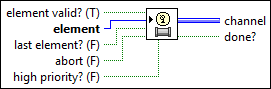
Inputs/Outputs
 element valid? (T)
—
element valid? (T)
—
element valid? specifies whether to record or ignore the element. If TRUE, the endpoint records that the element is good data. If FALSE, the endpoint ignores the value of element and records the default value of the transmission data type. The element valid? flag is available when the event is received by the Event structure. The endpoint does nothing if both element valid? and last element? are FALSE. The default is TRUE.  element
—
element
—
element specifies the data to write to the channel. This endpoint ignores the data if element valid? is FALSE or if abort is TRUE.
last element? (F)
—
last element? specifies whether this is the last element that the endpoint writes to the channel. The default is FALSE. If TRUE, the endpoint marks the channel as closed and ignores further calls to write. This output returns FALSE if abort is TRUE.
abort (F)
—
abort specifies whether to abort this channel. The default is FALSE. If abort is TRUE, this endpoint marks the channel as closed, ignores further calls to write, flushes previous events, and fires a single additional event to notify the Event structure that the channel has been aborted.
high priority? (F)
—
high priority? specifies whether to add the element to the front of the queue. The default is FALSE.  channel
—
channel
—
channel is the channel wire that connects this endpoint to a reader endpoint.  done?
—
done?
—
done? returns TRUE if the endpoint has written the last element or if any endpoint has aborted the channel. |
Related Information
Examples
Refer to the following example files included with LabVIEW.
- labview\examples\Channels\Event Messenger\Channel - Event Messenger.lvproj