VISA Set I/O Buffer Size Function
- Updated2025-07-30
- 3 minute(s) read
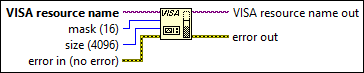
Sets the size of the I/O buffer. Run the VISA Configure Serial Port VI first if you are setting the size of a serial port buffer.
Inputs/Outputs
 VISA resource name
—
VISA resource name
—
VISA resource name specifies the resource to be opened. The VISA resource name control also specifies the session and class.  mask (16)
—
mask (16)
—
mask designates which buffer size to set.
 size (4096)
—
size (4096)
—
size designates the size of the I/O buffer in bytes. Set size slightly higher than the amount of data you expect to transmit or receive. If you call this function without specifying a buffer size, this function sets the buffer size to 4096 bytes. If you do not call this function, the buffer size depends on both VISA and the operating system configuration.  error in (no error)
—
error in (no error)
—
error in describes error conditions that occur before this node runs. This input provides standard error in functionality.  VISA resource name out
—
VISA resource name out
—
VISA resource name out is a copy of the VISA resource name that VISA functions return.  error out
—
error out
—
error out contains error information. This output provides standard error out functionality. |
Examples
Refer to the following example files included with LabVIEW.
- labview\examples\Instrument IO\Serial\Continuous Serial Write and Read.vi