TDMS Get Properties Function
- Updated2026-07-27
- 5 minute(s) read
Returns the properties of the specified .tdms file, channel group, or channel. If you wire the group name and channel name inputs with values, the function searches for properties at the channel level. Wiring only the group name input with a value searches for properties at the channel group level. If both group name and channel name inputs contain no values, the function searches for properties at the root level of the .tdms file. If you wire the channel name input with a value, you must also wire a value to the group name input.
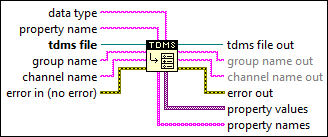
Inputs/Outputs
 data type
—
data type
—
data type controls the data type of the property values or property value output. This input accepts the following data types:
To return more than one property using the same function, you can wire a 1D array of any of the previously specified data types to the data type input. Each value in the array corresponds to a single property. However, a single property cannot hold an array of values.
property name
—
property name specifies the name of the property whose values you want to get. If you do not wire this input, this function returns the property names and their property values for the specified group name, channel name, or the entire .tdms file. If you wire this input, the property value output replaces property values and returns the value of the specified property; the found output replaces property names and returns TRUE. If the specified property does not exist in the .tdms file, the property value output returns the default value of the specified data type and the found output returns FALSE.  tdms file
—
tdms file
—
tdms file specifies a reference number to the .tdms file on which to perform the operation. Use the TDMS Open function to open the refnum.
group name
—
group name specifies the channel group to perform the operation on. If you wire a value to the channel name input, you must also wire a value to this input.
channel name
—
channel name specifies the channel to perform the operation on. If you wire a value to this input, you must also wire a value to the group name input.  error in (no error)
—
error in (no error)
—
error in describes error conditions that occur before this node runs. This input provides standard error in functionality.  tdms file out
—
tdms file out
—
tdms file out returns a TDMS file reference to the .tdms file on which you performed the operation.  group name out
—
group name out
—
group name out returns the name of the channel group on which you performed the operation.
channel name out
—
channel name out returns the name of the channel on which you performed the operation.  error out
—
error out
—
error out contains error information. This output provides standard error out functionality.  property values
—
property values
—
property values returns the property values of the specified channel group, channel, or .tdms file. This output is available only if the property name input is not wired. The data type of this parameter is determined by the data type input. property value
—
property value
—
property value replaces the property values output and returns the property value of the specified property. This output is available only if the property name input is wired. The data type of this parameter is determined by the data type input. property names
—
property names
—
property names returns the property names of the specified channel group, channel, or .tdms file. This output is available only if the property name input is not wired.  found
—
found replaces the property names output and indicates whether the specified property exists in the .tdms file or not. This output is available only if the property name input is wired.
found
—
found replaces the property names output and indicates whether the specified property exists in the .tdms file or not. This output is available only if the property name input is wired.
|
Examples
Refer to the following example files included with LabVIEW.
- labview\examples\File IO\TDMS\Concurrent Access to TDMS File.vi