Set Datalog Position Function
- Updated2026-02-04
- 3 minute(s) read
Moves the current datalog position of the file identified by refnum to the datalog position indicated by offset (in records) according to the mode in from.
The Write Datalog function changes the current datalog position to the end of the file. You cannot use this function to write to a different position in the file.
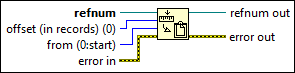
Inputs/Outputs
 refnum
—
refnum
—
refnum is the file refnum associated with the datalog file whose datalog position you want to set.  offset (in records) (0)
—
offset (in records) (0)
—
offset (in records) specifies how many records from the location specified by from to set the datalog position.  from (0:start)
—
from (0:start)
—
from, together with offset (in records), specifies where to set the datalog position. If you wire offset (in records), from defaults to 0, and the offset is relative to the beginning of the file. If you do not wire offset (in records), offset (in records) defaults to 0, from defaults to 2, and the operation starts at the current datalog position.
 error in
—
error in
—
error in describes error conditions that occur before this node runs. This input provides standard error in functionality.  refnum out
—
refnum out
—
refnum out returns refnum.  error out
—
error out
—
error out contains error information. This output provides standard error out functionality. |