WA Detrend VI
- Updated2023-02-21
- 8 minute(s) read
WA Detrend VI
Owning Palette: Feature Extraction VIs
Requires: Advanced Signal Processing Toolkit
Removes the trend from 1D signals by setting the approximation coefficients to zeros. Wire data to the signal input to determine the polymorphic instance to use or manually select the instance.
 | Note Use this VI for offline wavelet analysis. To remove the trend from streaming signals, use the WA Online Detrend VI. |
WA Detrend (Waveform)

 |
extension specifies the method to use to pad data at the borders of the input signal. The extension length is equal to the length of the wavelet filters. When you select the extension method, make the transition between the input signal and the padded data as smooth as possible because a smooth transition generates fewer large detail coefficients and enhances the efficiency of the signal representation.
|
||||||||||||
 |
signal specifies the input signal. | ||||||||||||
 |
threshold frequency specifies the upper frequency limit, in hertz, of the trend that this VI removes from the signal. The threshold frequency determines the wavelet transform level. The wavelet transform level specifies the number of levels in the discrete wavelet analysis. The wavelet transform level is floor(log2[sampling rate/(2*threshold frequency)]). The floor function rounds a value to the nearest integer towards negative infinity. The default is –1, which means this VI sets the threshold frequency automatically. | ||||||||||||
|
wavelet specifies the wavelet type to use for the discrete wavelet analysis. The default is db02. The options include two types: orthogonal (Haar, Daubechies (dbxx), Coiflets (coifx), Symmlets (symx)) and biorthogonal (Biorthogonal (biorx_x), including FBI (bior4_4 (FBI))), where x indicates the order of the wavelet. The higher the order, the smoother the wavelet. The orthogonal wavelets are not redundant and are suitable for signal or image denoising and compression. The biorthogonal wavelets usually have the linear phase property and are suitable for signal or image feature extraction. If you want to use other types of wavelets, do not wire this input. Instead, use the Wavelet Design Express VI to design the wavelet you want, bundle the resulting analysis and synthesis filters, and then wire them to the filter banks input. | ||||||||||||
 |
error in describes error conditions that occur before this node runs. This input provides standard error in functionality. | ||||||||||||
 |
filter banks specifies the analysis filter banks and the synthesis filter banks for the wavelet you specify. If you specify a value for filter banks, this VI ignores the settings in the wavelet input. You can use the Wavelet Design Express VI to design the analysis filters and the corresponding synthesis filters.
| ||||||||||||
 |
detrended signal returns the signal without the trend. | ||||||||||||
|
trend signal returns the residual trend of the signal. | ||||||||||||
 |
error out contains error information. This output provides standard error out functionality. |
WA Detrend (Array)
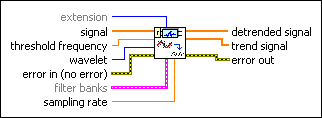
|
extension specifies the method to use to pad data at the borders of the input signal. The extension length is equal to the length of the wavelet filters. When you select the extension method, make the transition between the input signal and the padded data as smooth as possible because a smooth transition generates fewer large detail coefficients and enhances the efficiency of the signal representation.
|
||||||||||||
 |
signal specifies the input signal. | ||||||||||||
|
threshold frequency specifies the upper frequency limit, in hertz, of the trend that this VI removes from the signal. The threshold frequency determines the wavelet transform level. The wavelet transform level specifies the number of levels in the discrete wavelet analysis. The wavelet transform level is floor(log2[sampling rate/(2*threshold frequency)]). The floor function rounds a value to the nearest integer towards negative infinity. The default is –1, which means this VI sets the threshold frequency automatically. | ||||||||||||
|
wavelet specifies the wavelet type to use for the discrete wavelet analysis. The default is db02. The options include two types: orthogonal (Haar, Daubechies (dbxx), Coiflets (coifx), Symmlets (symx)) and biorthogonal (Biorthogonal (biorx_x), including FBI (bior4_4 (FBI))), where x indicates the order of the wavelet. The higher the order, the smoother the wavelet. The orthogonal wavelets are not redundant and are suitable for signal or image denoising and compression. The biorthogonal wavelets usually have the linear phase property and are suitable for signal or image feature extraction. If you want to use other types of wavelets, do not wire this input. Instead, use the Wavelet Design Express VI to design the wavelet you want, bundle the resulting analysis and synthesis filters, and then wire them to the filter banks input. | ||||||||||||
|
error in describes error conditions that occur before this node runs. This input provides standard error in functionality. | ||||||||||||
|
filter banks specifies the analysis filter banks and the synthesis filter banks for the wavelet you specify. If you specify a value for filter banks, this VI ignores the settings in the wavelet input. You can use the Wavelet Design Express VI to design the analysis filters and the corresponding synthesis filters.
| ||||||||||||
|
sampling rate specifies the sampling rate of signal in hertz. sampling rate must be greater than 0, or this VI sets sampling rate to 1 automatically. The default is 1. | ||||||||||||
 |
detrended signal returns the signal without the trend. | ||||||||||||
|
trend signal returns the residual trend of the signal. | ||||||||||||
|
error out contains error information. This output provides standard error out functionality. |
WA Detrend Details
The trend of the input signal is the slow-varying part of the signal that mainly contributes to the approximation coefficients. This VI applies the following steps to implement the detrend function.
- Applies the discrete wavelet transform (DWT) to the input signal.
- Sets the approximation coefficients to 0.
- Reconstructs the signal based on all the detail coefficients.
Example
Refer to the Detrend and Trend Estimation VI in the labview\examples\Wavelet Analysis\WAGettingStarted directory for an example of using the WA Detrend VI.